Obsidian Keeps Reloading on My iPad, So I Built a Plugin to Find the Plugins Killing It
I haven’t opened my Obsidian vault on my iPad in a few months. I could get maybe five or six taps in, open a note, start reading, and the whole thing would reload. About once a minute.
I knew it was one of my 46 plugins. I also knew the only advice anyone gives for finding it: turn plugins off one at a time until the problem stops. On a device that resets itself every sixty seconds. So I didn’t do that. I burnt some free Kiro credits having it build a plugin to do it for me.
That plugin didn’t work. Every number on its dashboard was a dash, and its 94 unit tests passed anyway. This post is why that happened, and what my vault looked like once something finally measured it. And then the sync, which is where it all went sideways again.
- Why Your iPad Keeps Reloading Obsidian
- The Plugin That Measured Nothing
- How You Measure a Plugin When Everything Shares One Thread
- What My Vault Looked Like Once Something Measured It
- Red Doesn’t Mean Delete
- Getting the Vault Onto the iPad
- It Stopped Reloading. Did the Sync Work?
- Keep It Installed, Keep It Off
Why Your iPad Keeps Reloading Obsidian
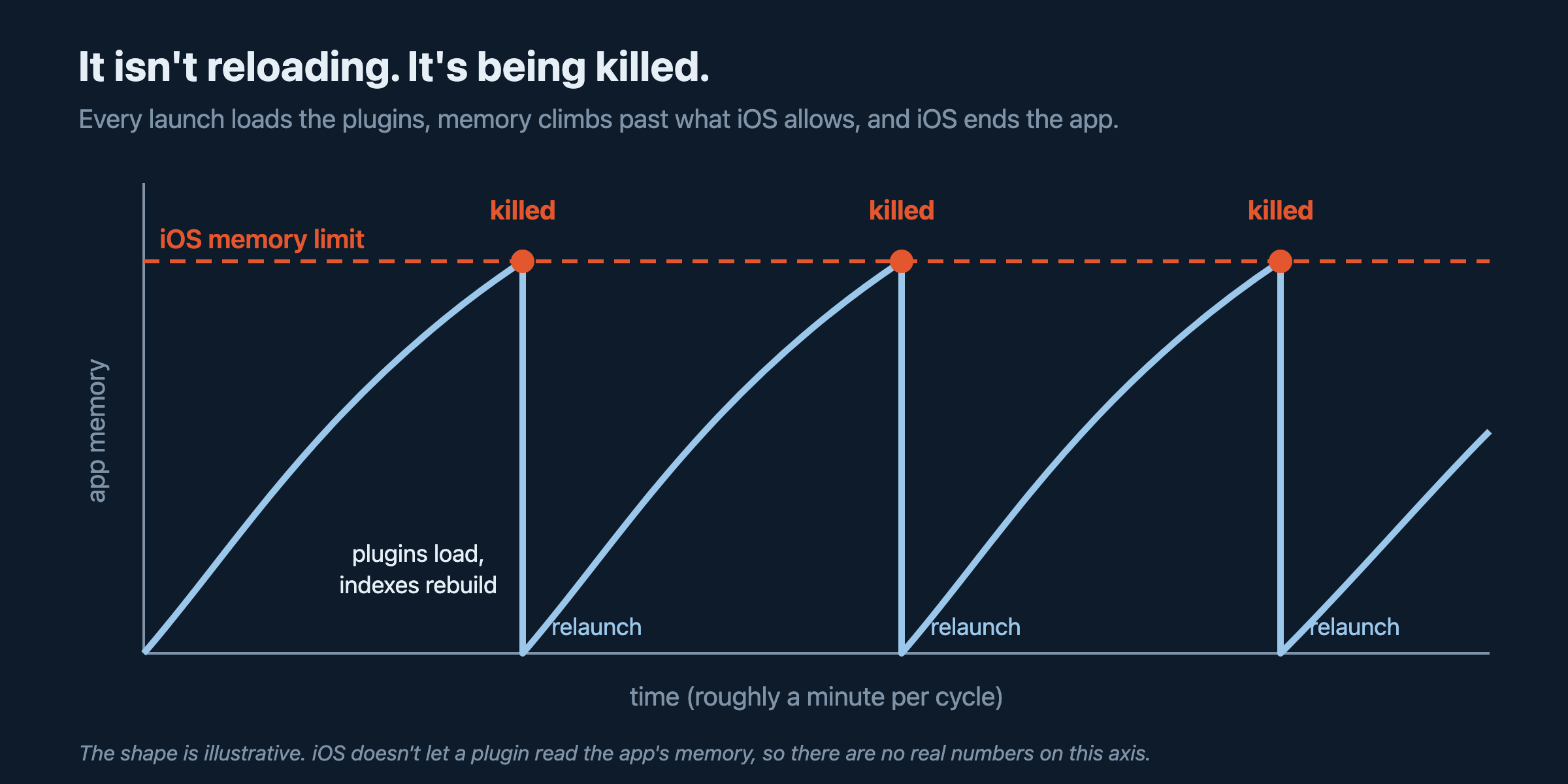
iOS gives every app a memory budget, and when Obsidian blows through it, the system kills the app. Obsidian relaunches, loads your plugins, blows through the budget again, and gets killed again. It looks like the app refreshing itself on a timer.
The Obsidian forum is full of threads describing the same loop: constant reloads on iOS, an iOS app that “continuously keeps loading and reloading”, and an iOS restart loop after an update that one user traced to Omnisearch. In another thread, the person whose iPhone kept reloading had 82 plugins and no idea which one was doing it. No judgment. I have 46. Another user replied that Waypoint had been restarting Obsidian on them. It’s usually the plugins that index your whole vault. Indexing a big vault takes a lot of memory.
The standard fix is bisecting. Disable half your plugins, see if the loop stops, then disable half of the half, and keep going. There’s a Divide and Conquer plugin that automates the toggling. It works. It’s also a miserable way to spend an evening with 46 plugins, and it only tells you which plugin crossed the line. It doesn’t tell you how close the rest of them are.
The Plugin That Measured Nothing

The idea was simple. Show me every plugin with how heavy it is, color it red, yellow or green, and give me one button that builds a separate config folder for mobile with the heavy ones stripped out. A setting called Override config folder lets a device read its settings and plugins from a folder other than .obsidian. My plugin would generate that folder for me.
This one started the same way as everything in my Obsidian plugin collection: a one-paragraph idea note and whatever I got for free from Kiro that month. Kiro wrote a full spec for it, then built it: a profiler, a compatibility database of known heavy plugins, a recommendations panel, and the config generator. It also wrote the test suite, including property-based tests that ran each check 100 times. My contribution was the idea note and the poking. I guided the building. It counts.
My quality control for those plugins is the same every time. I develop the plugin in my test vault, poke at it, and give it a label: done messing with it, needs another pass, or back on the shelf. Every load time was a dash. The traffic-light ratings column was empty. The one actual recommendation it made was “Disable Dataview on mobile,” which it got from the hardcoded list. I wrote it off as useless and it went on the shelf.
Months later I came back to it with Claude Code and asked what was wrong. Poking at it had been the right call.
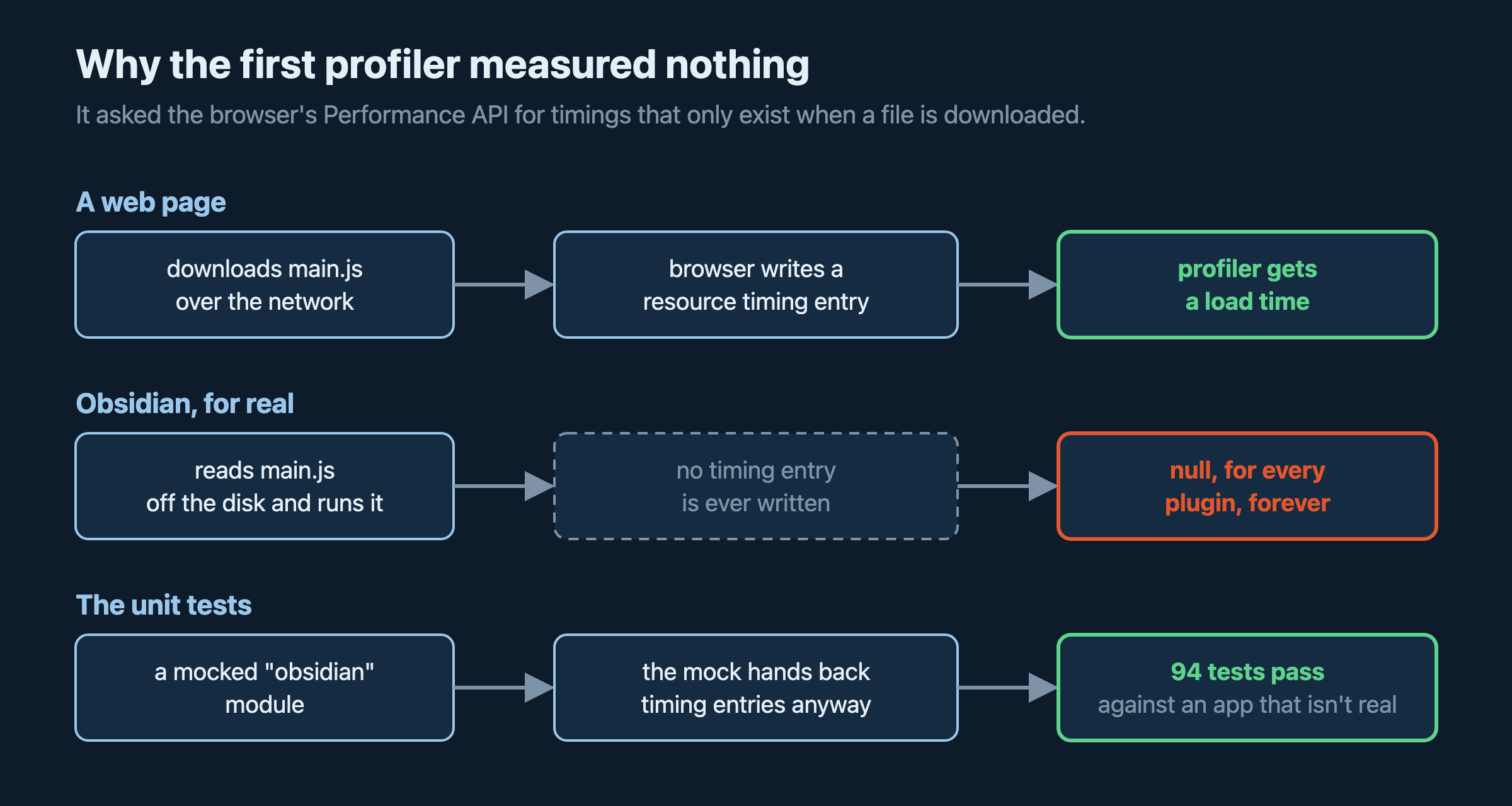
The profiler read from a log Obsidian never writes to. It looked up each plugin’s load time with the browser’s Performance API: named timing entries, plus “resource” entries for each plugin’s main.js. That works for files a web page downloads. Obsidian doesn’t download plugins. It reads main.js off the disk and runs it, so there’s never a resource entry and never a named entry.
The tests passed because they tested a fake Obsidian. The test suite mocked the obsidian module, and the mock used timing entries. So the tests proved the code worked against the Obsidian the tests imagined. 94 tests, the property checks running 100 times each: call it 9,400 green checkmarks.
The styles were in the wrong folder. Obsidian only loads styles.css from the root of a plugin’s folder. Kiro put it in src/. The traffic-light dots had no CSS, so they rendered as nothing, which is why the ratings column looked empty.
And a bonus one. The config generator copied the .obsidian folder, including every folder inside every plugin. I build my plugins inside a test vault, so that meant every repo’s node_modules and .git history. The “lean” mobile config it generated back in July was 794 MB and 44,347 files. Magnitudes bigger than the desktop config it was supposed to slim down.
How the bugs got found
None of this came from reading test output. Obsidian is an Electron app, and Electron apps will open the same debugging port Chrome:
open -a Obsidian --args --remote-debugging-port=9222
With that running, a short Node script can find the window for a specific vault and run JavaScript inside it. That’s how Claude Code checked the real thing instead of the mock. It asked the running app for its plugin list, asked my plugin’s profiler for its numbers, opened the dashboard, clicked its buttons, and read the table back. The answer took seconds:
// run inside the Test vault's window over the DevTools protocol
app.plugins.plugins["obsidian-mobile-optimizer"].profiler
  .collectMetrics()
  .map((m) => [m.pluginId, m.loadTimeMs]);
// every row: [pluginId, null]
performance.getEntriesByName() came back empty: zero resource entries, for every plugin. The bug was confirmed in the actual app in about a minute, after the unit tests had spent months saying everything was fine.
How You Measure a Plugin When Everything Shares One Thread
The reason this is hard is that Obsidian runs every plugin as JavaScript in one shared process, with one shared pool of memory. A browser can show you per-tab memory because each tab is its own process. Obsidian plugins aren’t, so there’s no “how much RAM is Omnisearch using” number to ask for. There’s an open feature request for exactly that.
You can’t measure a plugin directly. You can measure around it. The rebuilt plugin uses four measurements.
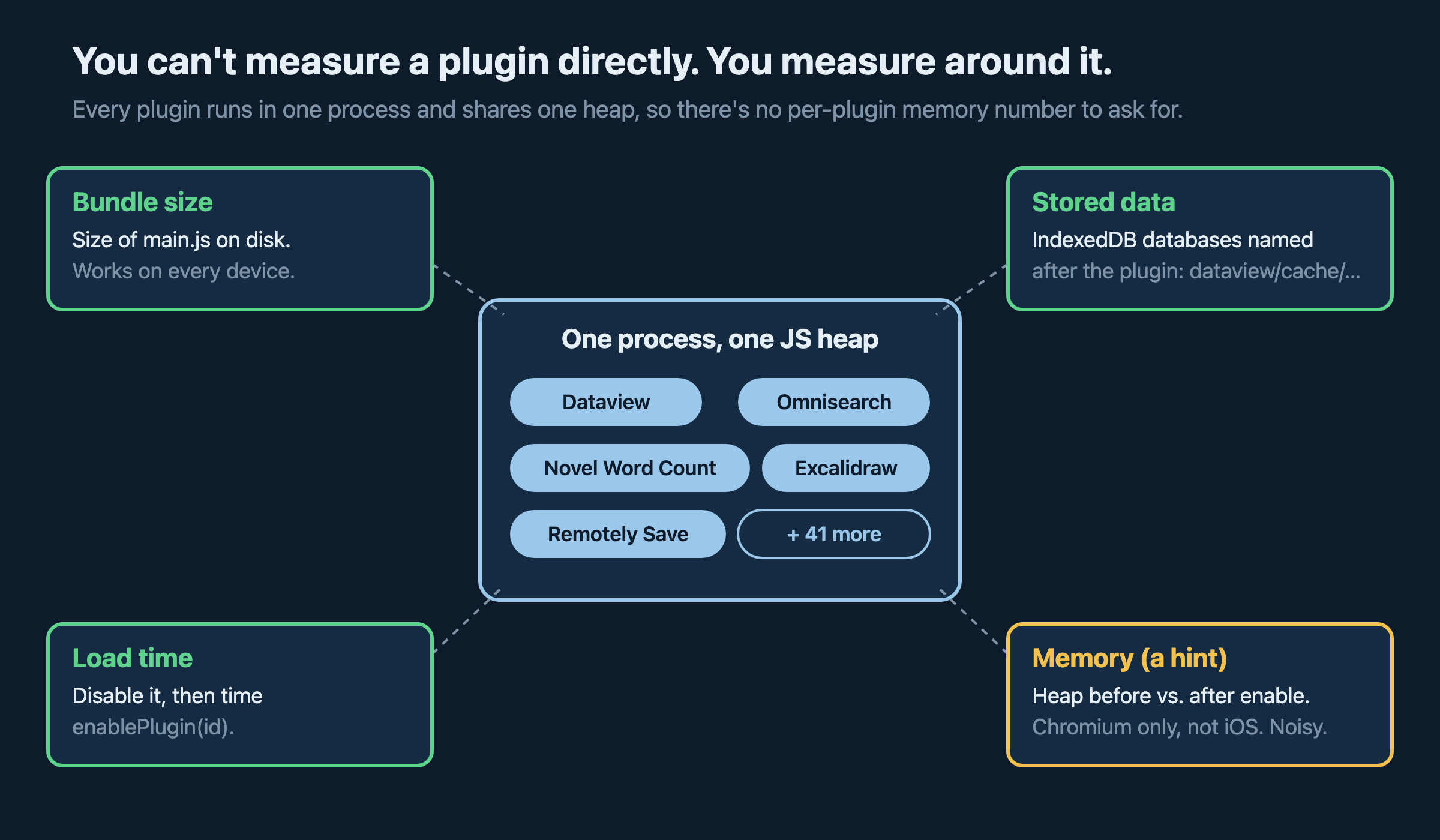
Bundle size. Every plugin is a main.js file, and it gets read into memory at startup. Most of mine are under 150 KB. A couple are over 4 MB. This works on every device.
Stored data. Plugins that build indexes and caches keep them in the app’s built-in IndexedDB database, and they name their databases after themselves: dataview/cache/<vault id>, omnisearch/cache/<vault id>, Excalidraw <vault id>. So the plugin can list the databases, figure out which plugin owns each one, and estimate the size by counting records and sampling a few. I’m hoping it’s the number that should catch the indexing plugins those forum threads keep blaming.
Load time. Turn the plugin off, then time turning it back on:
await app.plugins.disablePlugin(id);
const t0 = performance.now();
await app.plugins.enablePlugin(id);
const loadTimeMs = performance.now() - t0;
These are the in-memory versions of the calls. They don’t touch community-plugins.json, so every plugin ends up enabled as it was.
Memory. Read the JavaScript heap before turning the plugin back on and a moment after. The difference is roughly what that plugin added. This only works in Chromium, so desktop and Android, not iOS. It’s also noisy, because garbage collection can land in the middle of a measurement. I’ll get to how noisy.
With 9757 community plugins, I always look first because odds are I can just install something. When I went looking, I found the load-time half of this already exists. Obsidian has a built-in “Debug startup time” view (the docs on optimizing plugin load time cover it), and a community plugin called Startup Metrics Logger runs the same turn-it-off-and-on benchmark mine does. Separate mobile configs aren’t new either. People have been setting up Override config folder by hand for years.
So I didn’t invent plugin timing. What I couldn’t find anywhere was the stored-data measurement, and something that goes from the numbers to a working mobile config without you copying folders around by hand. That’s the whole plugin. It’s two buttons.
What My Vault Looked Like Once Something Measured It
I installed the rebuilt version in my real vault through BRAT, hit Measure load times, and got this:
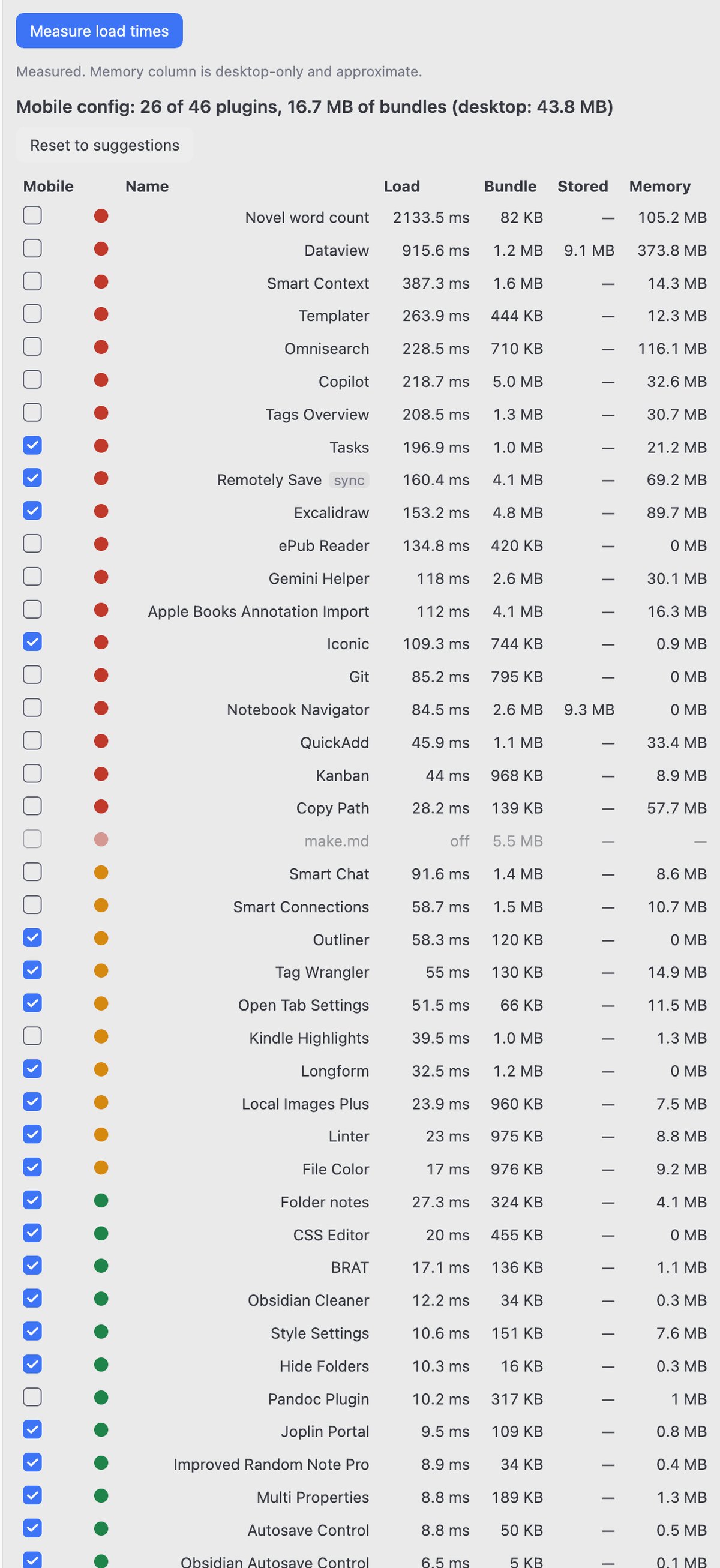
The worst plugin in my vault is Novel Word Count. It takes 2,133 ms to load and, by the noisiest measurement on the dashboard, adds 105 MB of memory. Nothing else comes close on load time. Dataview is second at 916 ms and tops that noisy memory column at 374 MB. Omnisearch adds 116 MB, Excalidraw 90 MB, same column, same caveat.
Novel Word Count had also been messing up my vault in other ways. Its whole job is counting. While digging into why the vault was 13.6 GB, I found its plugin folder: 1.7 GB. The plugin is 84 KB. The rest was 579 Dropbox “conflicted copy” versions of its data.json, going back to September 2024. The plugin rewrites that file every time counts change, the file had grown to several megabytes, and when two devices saved it close together, Dropbox kept both. A plugin that counts for a living had 579 of something in its own folder and never once reported the number. I deleted them.
Omnisearch showed a dash in the Stored column, and I assumed my database matching was broken. It wasn’t. Its saved index for my vault is empty: zero records in the search index, and the only data in there is my last ten searches. So it’s rebuilding the whole index in memory every time Obsidian starts. On an iPad, that’s every launch. There may be a setting for that. I haven’t gone looking yet. It’s not in the mobile config, so on the iPad there’s no index to rebuild.
About that memory column. Copy Path shows +57.7 MB. Copy Path copies file paths. That number is garbage collection landing at the wrong moment, not the plugin. Treat the memory column as a hint and the load time and bundle size as the numbers you trust.
Red Doesn’t Mean Delete
The first rebuilt version made the same mistake the original did. It decided for me. Everything red got stripped from the mobile config, no questions asked.
And look at Remotely Save in that screenshot. Red. 160 ms to load, a 4.1 MB bundle, 69 MB of memory. By the numbers it should go. It’s also the only reason I wanted Obsidian on the iPad, because it’s how my vault syncs there.
So now every row has a Mobile checkbox, and the colors only set the defaults. Red starts unchecked, yellow and green checked, and sync plugins (Remotely Save, Self-hosted LiveSync, Fit) checked whatever color they are, with a “sync” tag. Your choices are saved, so re-measuring doesn’t wipe them. And there’s a running total at the top. Mine says the mobile config carries 26 of my 46 plugins and 16.7 MB of bundles, against 43.8 MB on desktop.
I checked off some yellow plugins to keep four of the red ones, but this is all arbitrary anyway.
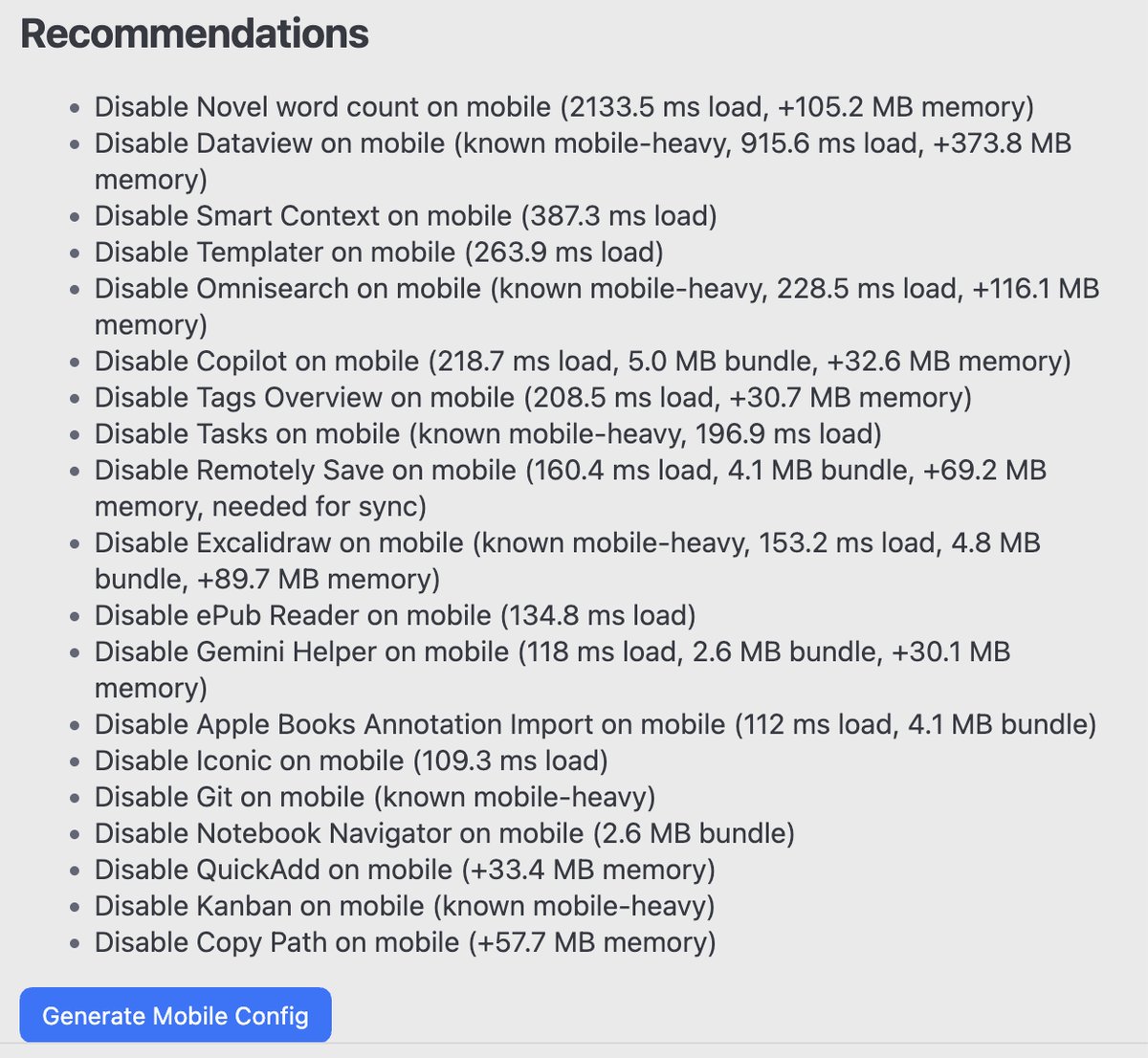
(That’s the Recommendations list, and it’s wrong: I took the screenshot on version 1.2.0, which still told me to disable Remotely Save “(needed for sync)” in the same sentence, and it lists Tasks, Excalidraw and Iconic, which I’d checked to keep. 1.2.1 only lists plugins that are being left off.)
Getting the Vault Onto the iPad
This is the part that’ll trip you up, because Obsidian on iOS hides things in different places than desktop.
My vault lives in Dropbox. I zipped it there, downloaded the zip with the Dropbox app on the iPad, and extracted it into On My iPad → Obsidian. Obsidian on iOS only opens vaults from inside its own folder. My first attempt was finding the vault folder in Files and choosing “Open with Obsidian,” which doesn’t open it. It imports the files into whatever vault is open.
Once the vault is in the right place, open the left sidebar, tap the vault name, choose Manage vaults, and open it from the list.
A newly added vault opens in restricted mode, with all community plugins off. Community plugins then offered me a toggle to “restore 46 previously installed plugins.” I didn’t know what it would do, so I turned it off and exited restricted mode. Every plugin came up disabled.
Do it in this order and skip that:
- Leave the restore toggle off. It brings back all 46, which is the desktop setup the mobile config exists to escape.
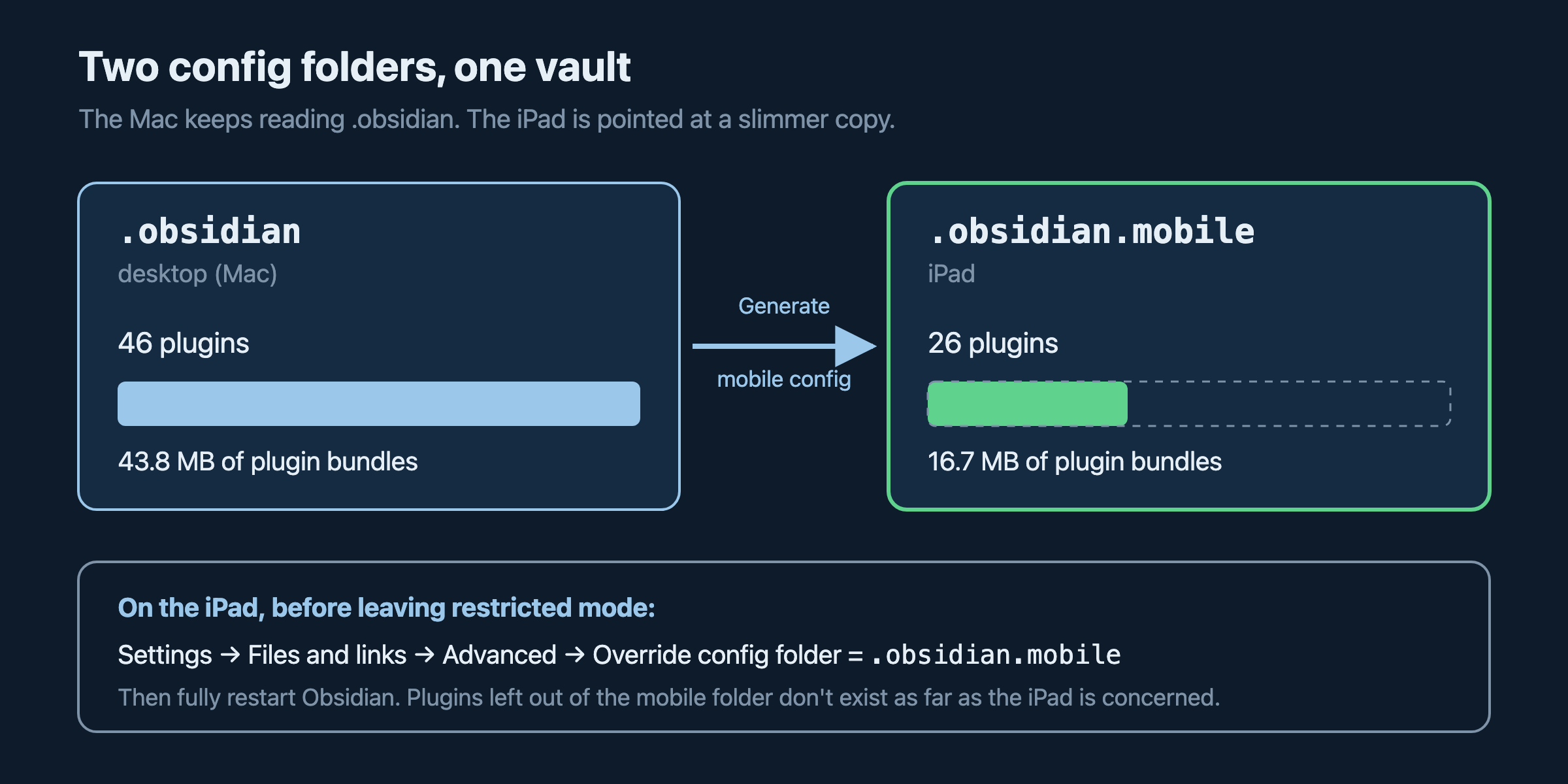
- Go to Settings → Files and links, scroll to the Advanced section at the bottom, and set Override config folder to
.obsidian.mobile. Do it before you leave restricted mode. - Restart Obsidian: swipe it away in the app switcher, then reopen it.
Now the iPad reads the mobile config instead of the desktop one. As far as the iPad is concerned, the plugins you didn’t keep don’t exist.
It Stopped Reloading. Did the Sync Work?
With the mobile config loaded, the reloading stopped. After months of not being able to use it, I’ll take it.
So I turned on Remotely Save, wrote “test” in an old daily note, and waited for it to show up on my Mac.
It didn’t. Remotely Save’s log had an error about the date on a file called _remotely-save-metadata-on-remote.json. I checked it on the Mac. Its modified date was December 31, 1969. The file predates Dropbox. It predates Obsidian. It predates the iPad it was refusing to sync to. It’s what the computer says when a timestamp is zero. I refreshed the date on the Mac, downloaded the fixed copy from Dropbox, and replaced the one on the iPad. That error went away.
The next one didn’t. Remotely Save stopped with “too many errors” after a pile of these:
Error: Dropbox does not support emoji in file / folder names.
That isn’t iOS, and it isn’t my file system. It’s a rule in Remotely Save’s own Dropbox code (version 0.5.25), which refuses to create any folder or upload any file with an emoji in the path. I use emoji in file and folder names. It’s part of how the vault is organized now. And the same vault, emoji and all, already syncs through Dropbox between two Macs without complaint. So this is Remotely Save being stricter than Dropbox needs it to be.
I wrote a whole post on setting up Obsidian Dropbox sync with Remotely Save, and my guide to syncing Obsidian on iPhone and iPad for free says I run Dropbox with Remotely Save on my iPad. The point of fixing the crash was to get that sync back. The plugin fixed the crash. The sync it was all for is still broken.
Keep It Installed, Keep It Off
Where this leaves things: the iPad opens my vault and doesn’t reload. Sync from the iPad doesn’t work yet, because of the emoji rule. Remotely Save is open source, and that check is a few lines of code, so a pull request is on the someday list right next to everything else.
The plugin doesn’t need to stay on. It’s about 14 KB and does nothing until you open its dashboard, and your keep-on-mobile choices are saved in its settings. So the routine is: enable it, measure, adjust the checkboxes, generate, and disable it. Run it when you install new plugins, because one of them is going to be the next Novel Word Count.
It’s on GitHub at eristoddle/obsidian-mobile-optimizer. Install it with BRAT by adding eristoddle/obsidian-mobile-optimizer. If your iPad has been reloading Obsidian at you for months, measure first. Bisect only if you still need to.
Related Posts

Remotely Save for Obsidian: S3 and WebDAV Sync That Costs $0 on R2
Remotely Save syncs Obsidian to your own S3 bucket or WebDAV server. My 1.6GB vault costs nothing on Cloudflare R2. The setup and the catches.

Obsidian OneDrive Sync: The Setup Windows Already Installed for You
OneDrive is already on your Windows machine, so it is the easiest Obsidian sync to start. Here is how to keep it from eating notes on desktop, iPhone, and An...

Syncing Obsidian with Google Drive Is the Trickiest One. Here Is How Anyway.
Google Drive is the cloud storage everyone already has and the worst supported option Obsidian has. Here is the desktop path, the plugin, the paid route, and...