
Wishbar Review: I Typed My Blog's Back Office Into One Menu Bar Tab
My blog runs on a bunch of things I can’t see. A cron on a mini PC writes the Model Buzz roundup every Tuesday. Another one merges publish branches on the day they’re supposed to go live. The Search Console login dies every seven days. Posts have refresh dates buried in their frontmatter. And the only way I find out any of it is going wrong is by running a script, SSHing somewhere, asking my agent, or noticing a week later.
So when Wishbar showed up in my inbox and its pitch was “type what you want, your AI builds it as a widget,” I didn’t think weather and stock tickers. I thought that’s the dashboard I keep meaning to build and never do.
Disclosure: The developer gave me a free licence to test Wishbar, and the Wishbar links in this post are affiliate links. If you buy through one, I get a cut, and it costs you nothing extra.
- What Wishbar Is
- It Found My Claude Code and Just Started
- Under the Hood: Widgets Are Just Files
- Why This Is a Pit Crew Post
- The Blog Tab, One Wish at a Time
- The Whole Tab
- What I’ll Wire Up Next
- Every Dev Needs a Canvas
What Wishbar Is
Wishbar is a Mac menu bar app. You type a wish in plain English, and an AI agent writes it as a live widget in a panel that drops down from the menu bar.
It builds with your own AI account. A free ChatGPT account works. Claude needs a Pro or Max plan. Tokens only burn while a widget is being built or changed. Once you keep it, the widget runs locally with no AI at all, unless you built it to call the AI on purpose.
Other things worth knowing:
- Widgets can send notifications even with the panel closed, and can repeat an alarm until you hit “Got it.”
- A widget asks for Mac permissions one at a time (Calendar, a folder, notifications). The app itself asks for nothing.
- Builds take one to three minutes Changes take under 30 seconds.
- Pay once, no subscription, updates included. That works because it runs on your own Claude or ChatGPT plan, so there’s nothing for them to bill you monthly for. Solo (1 Mac) is $39, Personal (2 Macs) is $49, Family (5 Macs) is $69. As I write this, a Black Friday and Cyber Monday sale has them at $19, $24 and $34. The sale runs until about December 7. 7-day free trial, no card. 14-day refund.
- macOS 13 or later, Apple silicon and Intel. No Windows.
It Found My Claude Code and Just Started
Wishbar found my Claude Code install and was ready to go. The Claude row in its Agent settings shows the same version number as claude --version in my terminal, and it warns that signing out signs Claude out in Terminal too. So it’s driving the Claude Code I already have.
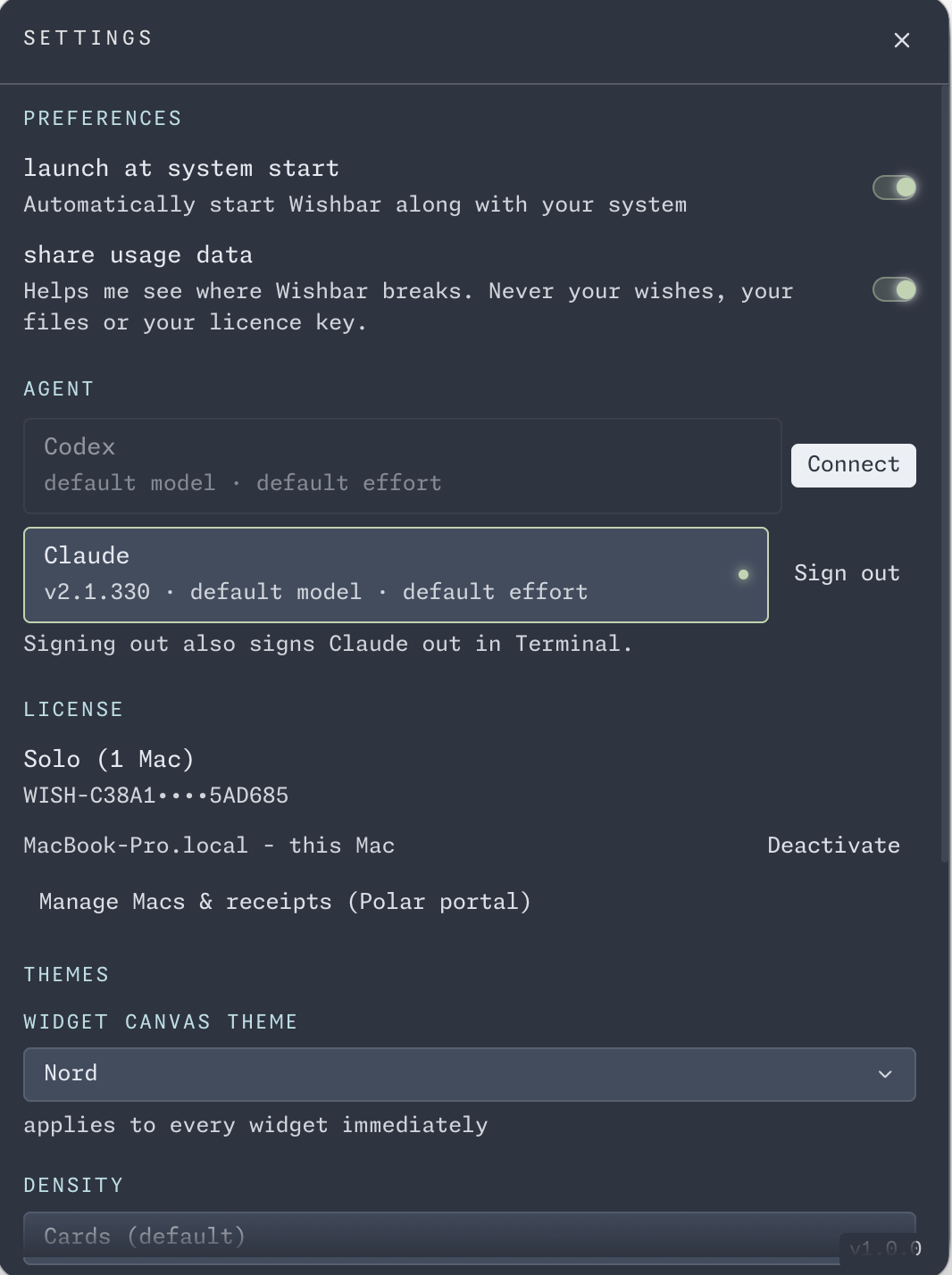
Setting up a API key for a provider isn’t that much of a pain in the ass. But “installed it and it worked” is better than “installed it and spent ten minutes in a settings screen.”
Under the Hood: Widgets Are Just Files
Every widget is a folder in ~/.wishbar/extensions/. Open one up and it’s a small React app: a widget.tsx, a components.tsx for the view, and, for widgets that need to touch the system, a server.ts. It can read files, run commands, and fire native notifications. The view can’t. That split is what makes a blog dashboard possible: a widget can read my repo and run git, as long as that work lives in the server half.
There’s an AGENTS.md in the folder also, which is the instruction file the builder agent reads every time you make a wish. One rule in it changes how you should write wishes: the agent is told to stay inside its own folder and never go searching through your home directory. It’s allowed to read a specific path you name.
Why This Is a Pit Crew Post
This post is part of My Blog’s AI Pit Crew, the series about all the grunt work AI does on this blog: finding ideas, research, editing, images, SEO, and publishing. The first one was the skill that turns one project into a board of post ideas.
There are enough things happening that I can’t keep track of it. That’s what this tab is for. Every widget below is watching a part of the process, and most of those parts will get its own post in this series later: the publish-branch cron, the refresh registry, the SEO setup that comes with a seven-day expiring token. If a widget makes you wonder how the thing behind it works, that’s a post that’s coming.
The Blog Tab, One Wish at a Time
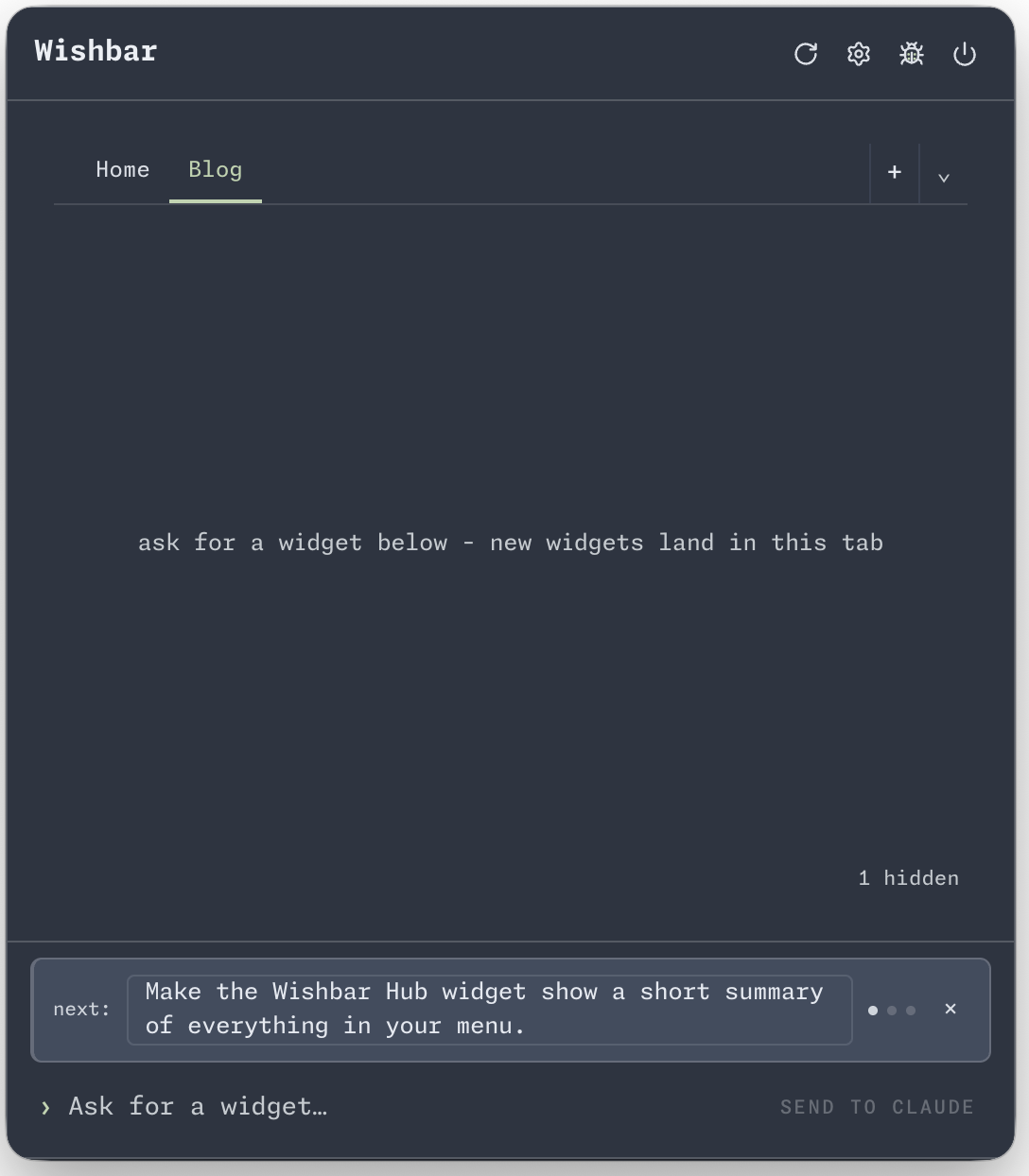
Making the tab was the easy part. I clicked “+ new tab”, named it Blog, and had an empty dashboard to build into.
1. Search Console Login Countdown
My Search Console login expires every seven days. I find out by running an SEO report and getting invalid_grant back. The login script writes a token file, so the age of that file is a countdown.
The wish:
Make a widget called "GSC login" that shows how many days are left on my Google Search Console login.

Read the modified time of this one file: /Users/eristoddle/.config/gcloud/sm-seo-token.json
The login lasts 7 days from that time. Show "X days left" big, and the expiry date and time small underneath.

Green with 3 or more days left, yellow with 1-2 days left, red on the last day, and "Expired" in red once it's past 7 days.

When it's red or expired, show this command with a copy button:
python3 .claude/scripts/gsc_auth.py
and a note that it runs from /Users/eristoddle/sm-static

Send me one notification when it turns red, and one when it expires. Not every refresh, just once per state change. Check in the background every hour. Don't read the contents of the file, only its modified time.
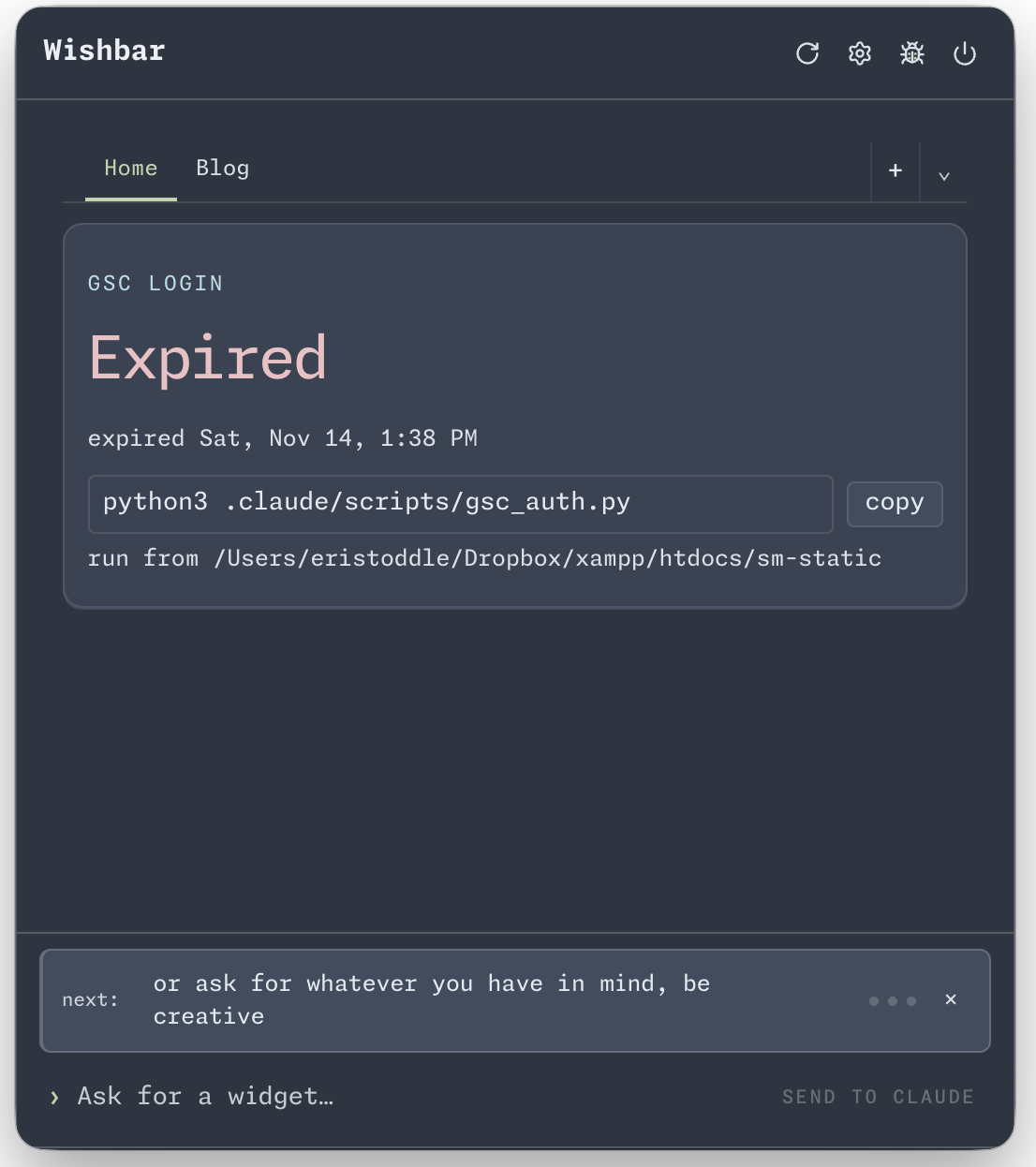
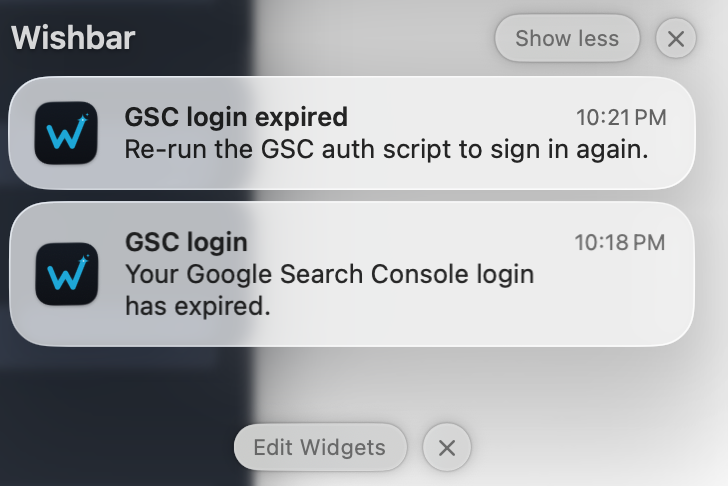
What happened: it said “Expired,” which is correct.
It took me two tries, and the second was my fault. I built the widget on the Home tab instead of Blog. I asked the agent to move it to Blog, which is the dumb, slow way. The card has a menu in its top left corner with move, hide and collapse, and moving it there takes a second.
Wishbar also puts a “next:” bar under the panel with suggestions for what to wish for next. For this widget, they were to notify me when there are two days left and to show progress, which is a pretty decent idea. You can also close it with the X.
The widget also sends real macOS notifications. Because the login was already expired when I built it, I got both the “red” and the “expired” notifications at once.
2. Publishing Slots Board
I publish on a loose schedule. Wednesday is for my own standalone posts, Thursday is for a series post, Friday and Monday are optional, and Tuesday is for the Model Buzz Report. The question I keep asking is “which slots in the next two weeks have nothing in them?” and answering it means looking at filenames in two places, because a post that’s been edited and is waiting on its publish branch isn’t on master yet.
The wish:
Make a widget called "Slots" that shows my blog's publishing slots for the next 14 days, starting today.

Only show Mondays, Wednesdays, Thursdays and Fridays as slots. Show Tuesdays as a grey row that says "Model Buzz (auto)" and is never counted as open.

A slot is filled if either:
1. A post file exists whose filename starts with that date, anywhere under /Users/eristoddle/sm-static/_posts/ (it has subfolders, look in all of them). Filenames look like 2026-11-26-some-slug.md.
2. A git branch named publish/YYYY-MM-DD exists on origin for that date. Get the list with this command run in /Users/eristoddle/sm-static:
   git ls-remote --heads origin 'publish/*'

For a filled slot, show the post's title from its frontmatter, and a tag:
- "draft" if the file has published: false
- "ready" if there's a publish branch for that date
- "live" if published: true and the date is today or earlier

For an open slot, show "open" in a highlighted color, and label Wednesday "own post" and Thursday "series post" as a hint, nothing more.

At the top, one line: "N open slots in the next 2 weeks". Read-only. Never write to the repo.
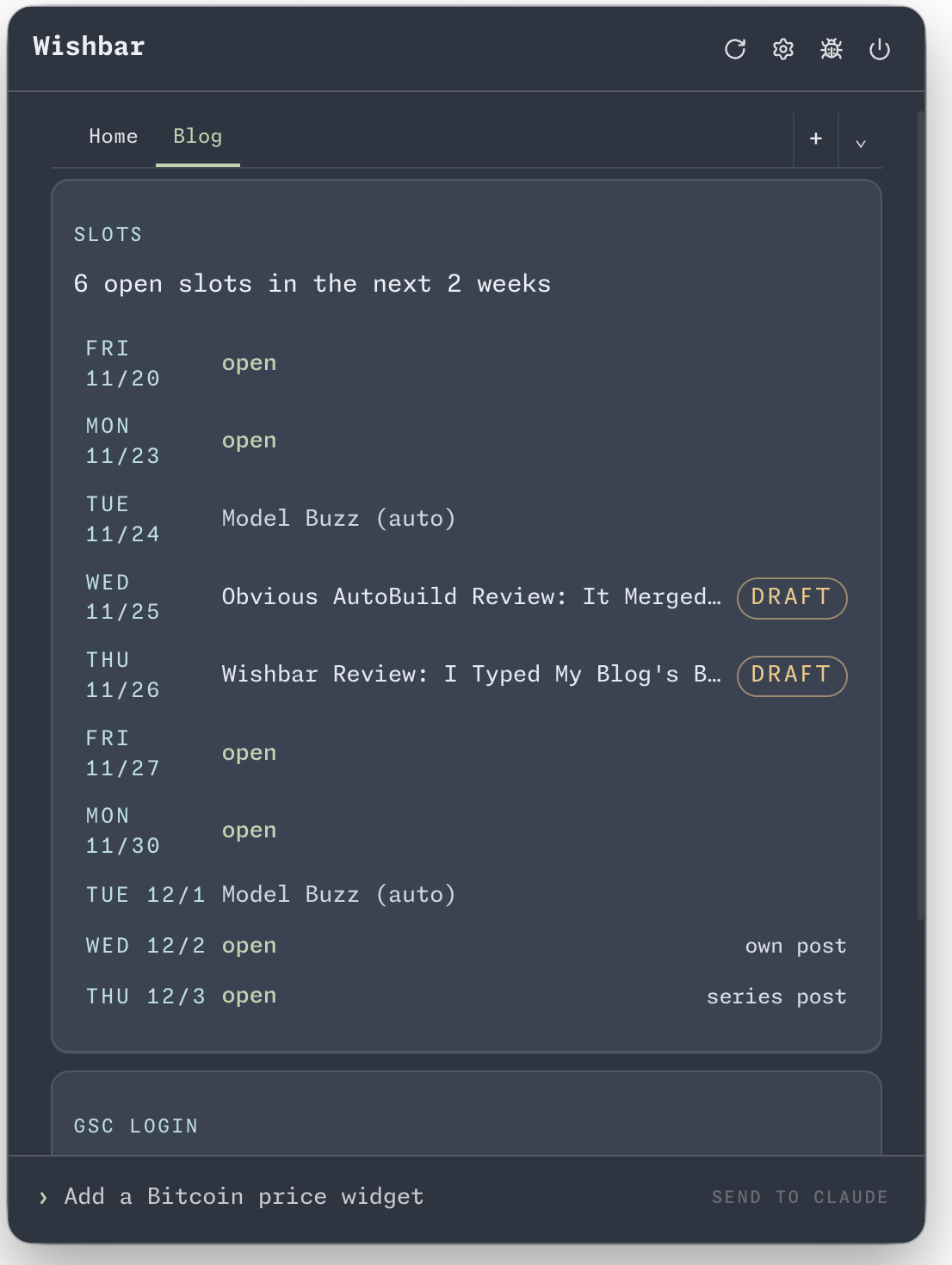
What happened: it worked on the first try. Six open slots in the next two weeks, Tuesdays greyed out as Model Buzz, drafts tagged “draft,” and the “own post” and “series post” hints on the open Wednesday and Thursday.
It isn’t right yet, though. It put my Obvious AutoBuild review in Wednesday’s slot, and I’d already given that post a date, because the vendor is releasing on that date. So the wish needs to handle posts with a set date better. That’s my prompt’s fault, not Wishbar’s, and I’m leaving it for now because seeing it work gave me more ideas about what this widget should do.
3. Publish Branch Watch
Once I’ve edited a post, it goes on a branch named for the day it publishes, and a cron on the mini PC merges it on that day. That’s great until the box is off, or there’s a merge conflict, and nothing goes out and nothing tells me.
The wish:
Make a widget called "Publish branches" for my blog repo at /Users/eristoddle/sm-static.

1. List the branches on origin named publish/YYYY-MM-DD with:
   git ls-remote --heads origin 'publish/*'
   Only show the ones dated today or later, oldest first, with "merges in N days" next to each ("merges today" for today).
   If any are dated before today and still exist on origin, show them at the top in red as "missed?", because the merge cron should have deleted or merged them.

2. Below that, a "last deploy" check: run git fetch origin master --quiet, then find the newest post file on origin/master under _posts/ (any subfolder) whose filename date is today or earlier and whose frontmatter says published: true. The URL is https://www.stephanmiller.com/<slug>/ where the slug is the filename without the date prefix and .md. Request that URL and show green "live" for a 200, red with the status code for anything else.

Only refresh when I open the panel or press refresh. Don't poll or run anything in the background.
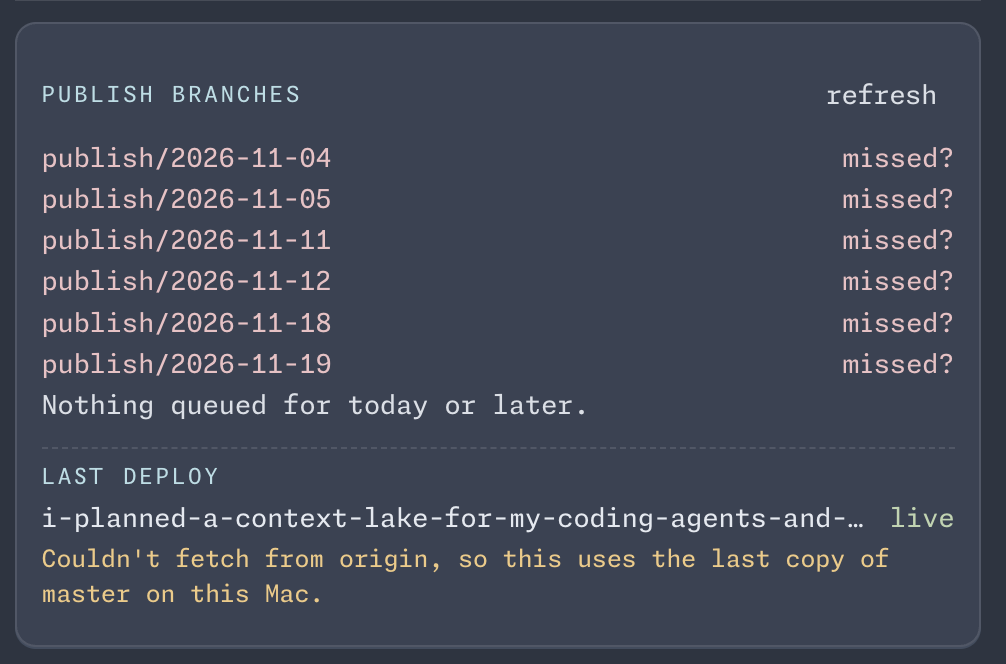
What happened: it lit up red on all six publish branches still on GitHub, every one marked “missed?” Not one of those posts was missed. They all went out. What I’d actually found was a hole in the pipeline: nothing deletes a publish branch after the cron merges it.
So the wish’s rule was wrong: “dated before today and still on origin” doesn’t mean missed, it means nobody cleaned up. The better rule is to flag only branches whose commit isn’t in origin/master yet. That’s the next version of the wish, or the cron deletes its own branches and the original wish works as written.
The bottom half, the last deploy check, said “live,” but also warned “Couldn’t fetch from origin, so this uses the last copy of master on this Mac.” The widget could list the branches, which only needs a read of the remote, but couldn’t run a fetch.
4. Upkeep Due
Some posts go stale on a clock. A title with “2026” in it is old on January 1, and posts like that have a refresh_due: date in their frontmatter. The whole-site checks, like the outbound link audit, run quarterly. Both of those only work if I remember to look.
The wish:
Make a widget called "Upkeep" with two sections.

Section 1, "Refresh due": look through every .md file under /Users/eristoddle/sm-static/_posts/ (all subfolders). In the YAML frontmatter at the top of each file, find a line like refresh_due: 2026-11 (year-month). List every post where that month is this month or earlier. Show the post title, the due month, and the refresh_why: line if there is one. Overdue ones (earlier than this month) in red, due this month in yellow. If none, say "Nothing due" in green.

Section 2, "Link audit": look in /Users/eristoddle/sm-static/_seo/archive/ for folders named link-audit-YYYY-MM-DD. Take the newest date and show "last run N days ago". The audit runs quarterly, so green under 80 days, yellow 80-90, red over 90, and show the command to run it:
python3 .claude/scripts/link_audit.py

Read-only.
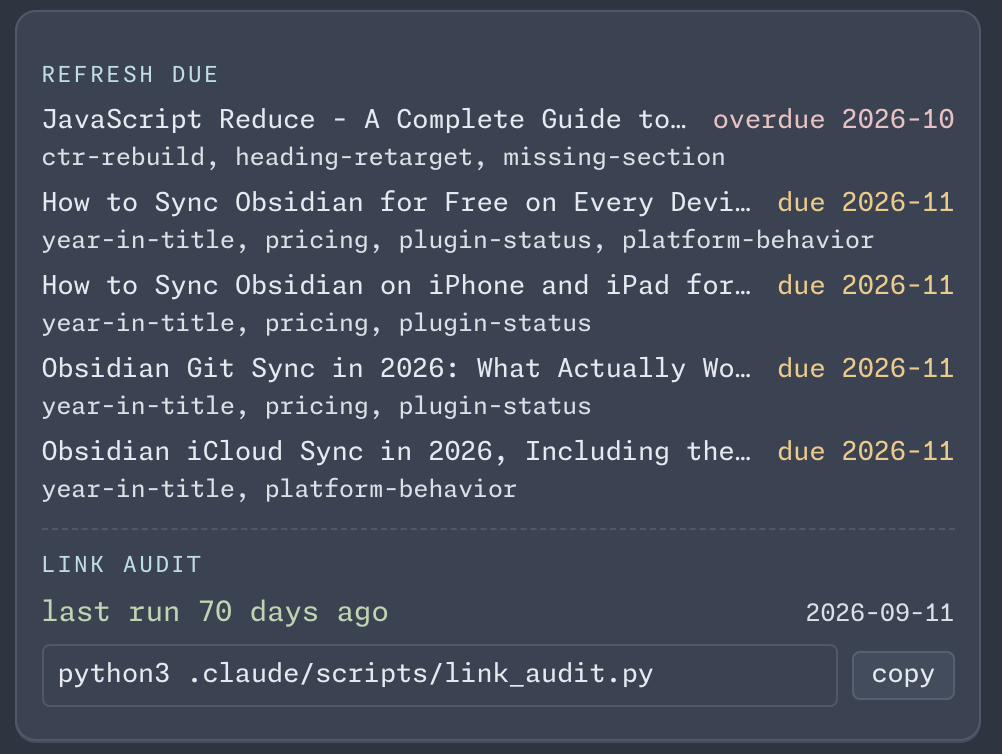
What happened: it worked. It found one overdue refresh and four due this month, each with the reason I’d registered it (year in the title, pricing, plugin status), and the link audit last ran 70 days ago, which is still green.
The reason it’s useful is that all of this is stuff I have to remember to ask my AI about. I could tell a skill to remind me at the start of every session, but then it nags me, I tell it to stop, and back to forgetting. This is a place I open when I want to know, and it never says anything unless I look.
5. My Git Working Tree Is My To-Do List
Anything that isn’t finished stays uncommitted, so git status is the list. It’s a good system right up until I forget to run git status.
The wish:
Make a widget called "In progress" that shows what's uncommitted in my blog repo at /Users/eristoddle/sm-static.

Run: git status --porcelain
For each changed or untracked .md file under _posts/, show the post's title and date from its frontmatter, plus "new" if it's untracked or "edited" if it's modified. Untracked folders like _drafts/ will show up as one line; list the .md files inside them too, by filename.
Put everything else (non-post files) in a collapsed "other files" group with a count.

Clicking a post opens it with: open -a "Visual Studio Code" <full path to file>

Read-only otherwise. Never run git add, commit, stash or anything that changes the repo.
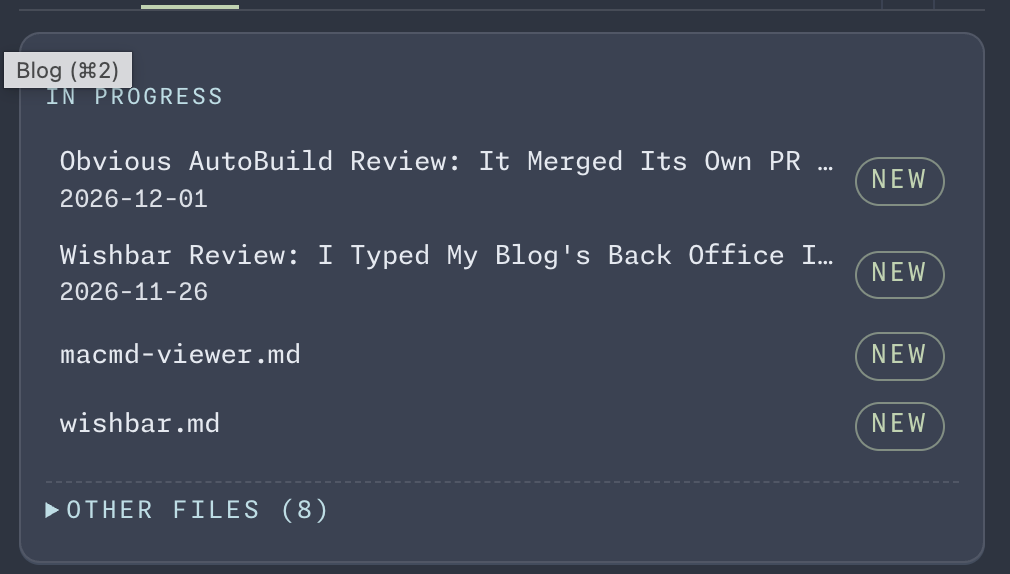
What happened: it worked. The two posts show up by title and date, tagged new, and.
The part I’d tweak is _drafts/. I use that folder for raw notes: pasted screenshots, text I’ve dictated while doing something else. They’re not posts yet, and they move into the posts folder once I start writing. The widget lists those files the same way it lists posts, so two notes files (macmd-viewer.md and wishbar.md) sit mixed in with the real drafts. That’s how I use the folder, not a Wishbar problem, and it’s a small change. After this post I’m going to try combining this one with the slots board and the publish branches into one status widget.
Clicking a post opened it in VS Code, as asked. That’s the part I’ll change, because I’d rather it open in my own markdown editor.
6. Which Series Is Up Next
I have several series running at once, and the rule is that the one that’s gone longest without a post goes next. Working that out means finding the newest post in each one.
The wish:
Make a widget called "Series" for my blog repo at /Users/eristoddle/sm-static.

Every folder directly under _posts/ whose name is not a 4-digit year is a series (for example ai-pit-crew, model-buzz, obsidian-recipes, firecrawl-cookbook). Skip model-buzz, that one is automatic.

For each series folder, find:
- the newest post with published: true in its frontmatter: its title and date, and "N days ago"
- how many posts have published: false (drafts waiting)

Sort so the series with the oldest "newest published post" is on top, and mark that one "up next".
If a series has a draft dated in the future, show that date as "next: <date>".

Read-only.
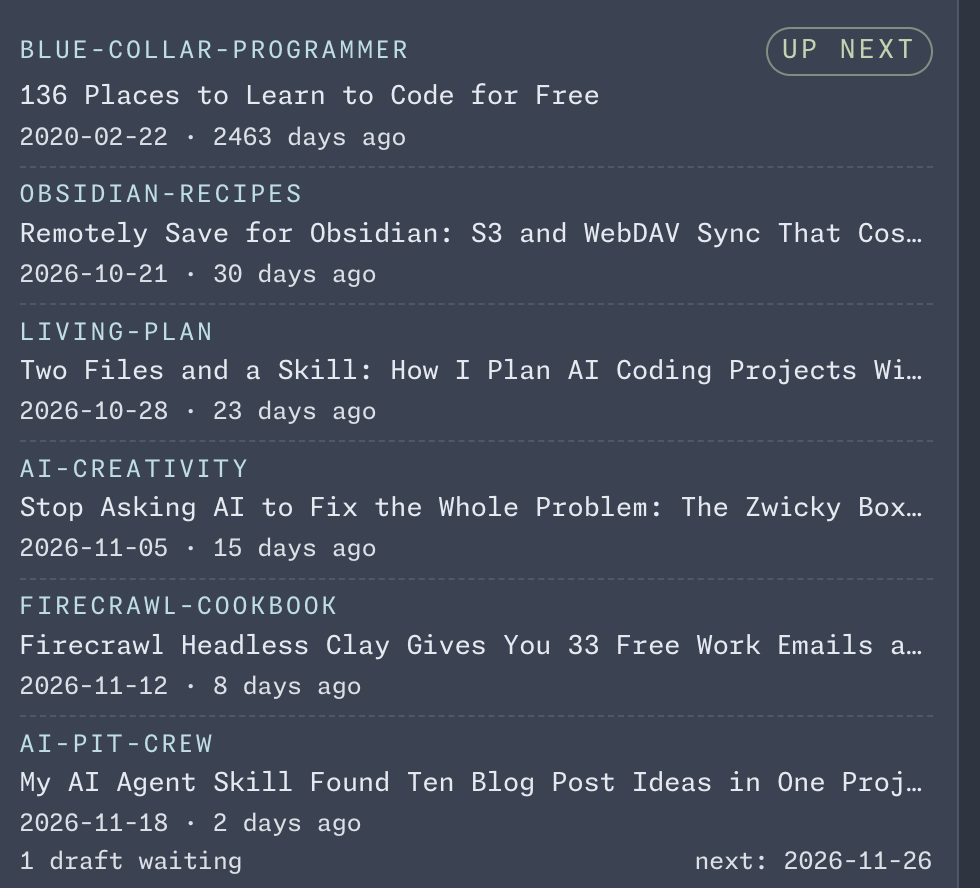
What happened: it did what I asked, and I should have thought about it more. It found six series, listed the newest published post in each, and put the one that’s gone longest on top with an “up next” tag. At the bottom, it found this post.
The series it picked as up next was my Blue Collar Programmer series, whose newest post is from 2020, 2,463 days ago. It’s on hold. The fix is in the project: that series needs a marker that says it’s paused, and then the wish can skip anything with the marker.
7. Model Buzz Pre-Read
Every Tuesday a cron researches which AI models people are actually using and drafts the Model Buzz report. One of its signals is OpenRouter’s usage rankings. This widget is me looking at that signal before the cron does.
The wish:
Make a widget called "Model buzz" that shows the top 10 models on OpenRouter's rankings page by token usage this week: https://openrouter.ai/rankings

Show rank, model name, and token count. Save each day's top 10 so you can show movement: an up or down arrow with the number of places moved since the snapshot from 7 days ago, and "new" for models that weren't in it.

Take a snapshot once a day in the background. If the page can't be read without a browser, or the numbers aren't in the HTML, show an error saying exactly that. Never show made-up or placeholder numbers.
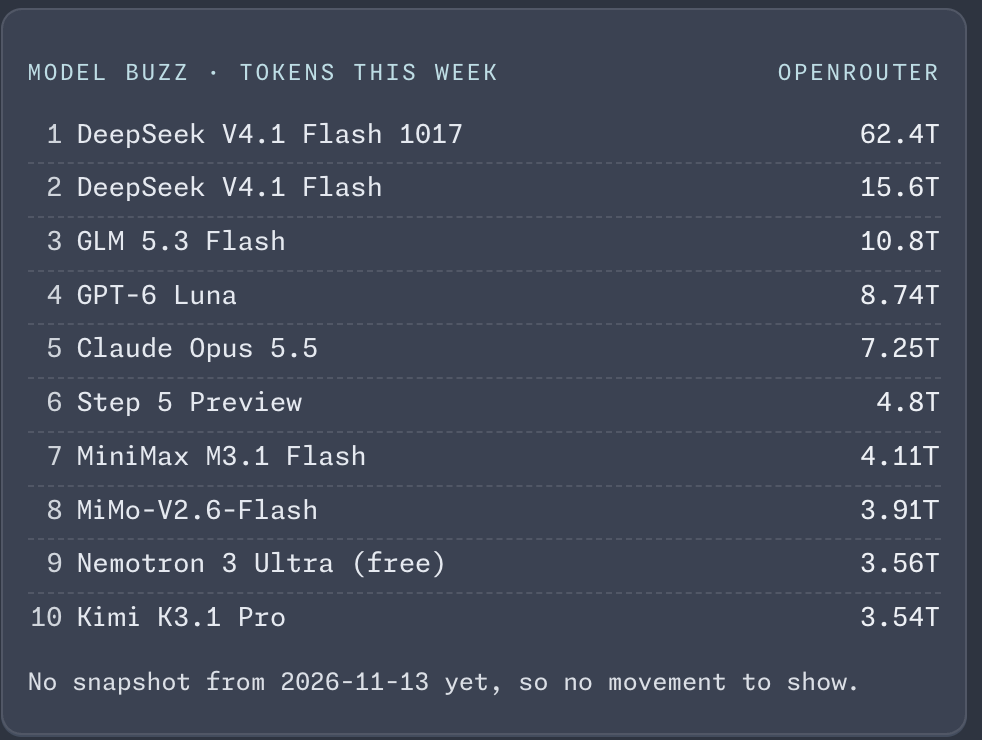
What happened: the scrape I expected to fail worked on the first try. It pulled the top 10 with token counts, and it told me that it had no snapshot from a week ago yet, so there were no movement arrows to show.
OpenRouter has a habit of showing free models with odd codenames that are really an unreleased model in disguise, and you don’t find out what it was until weeks later when it launches under its real name.
8. Claude Code Usage
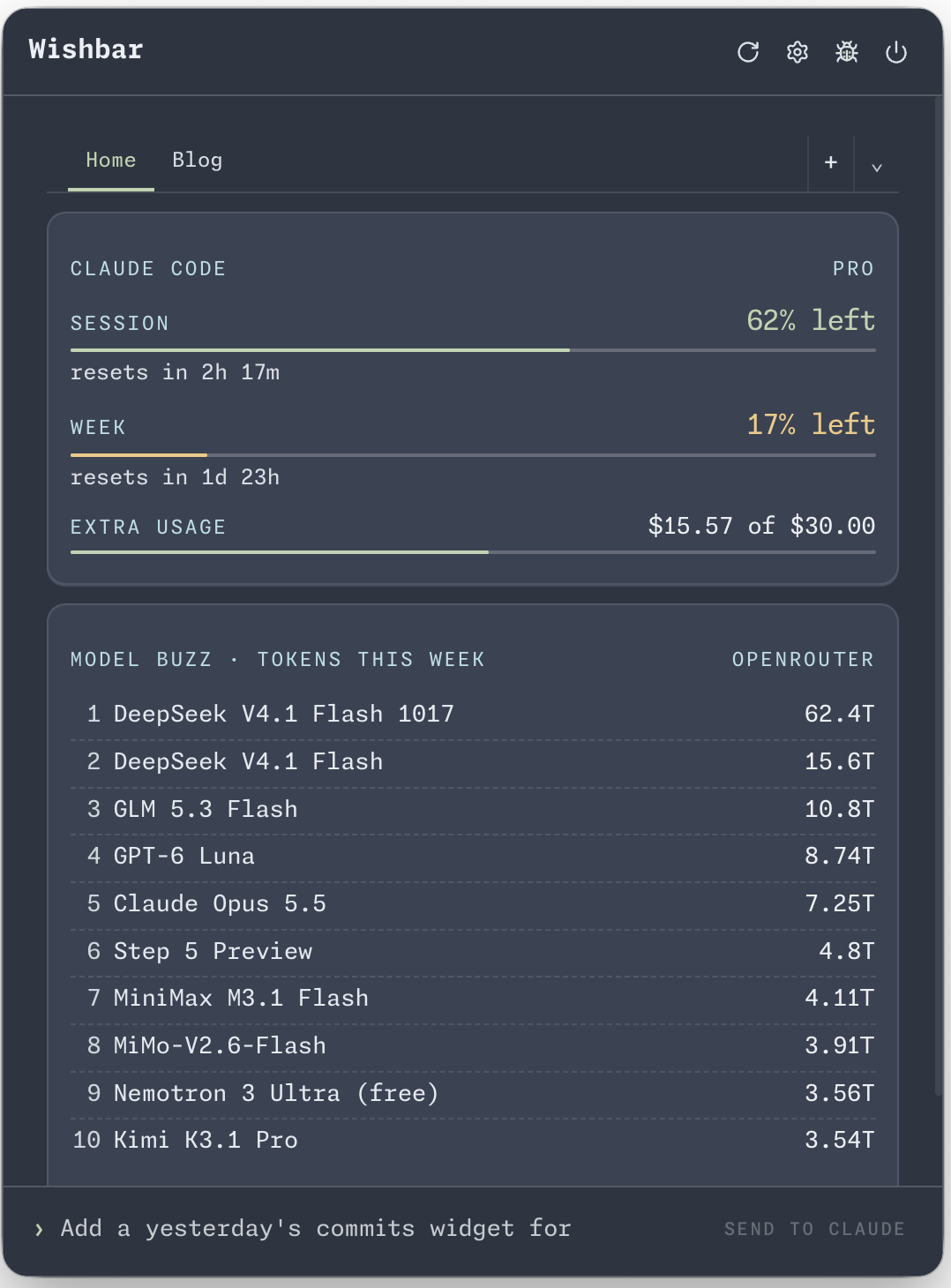
Wishbar ships with this one as a recipe, so it’s the one I didn’t have to write. It reads plan windows, resets and tokens from Claude Code’s own data on the Mac. I already run claude-hud in my terminal’s status line for this, so the question is whether a menu bar view is worth having on top of it.
The wish:
Add the Claude Code usage widget from your recipes to this tab.
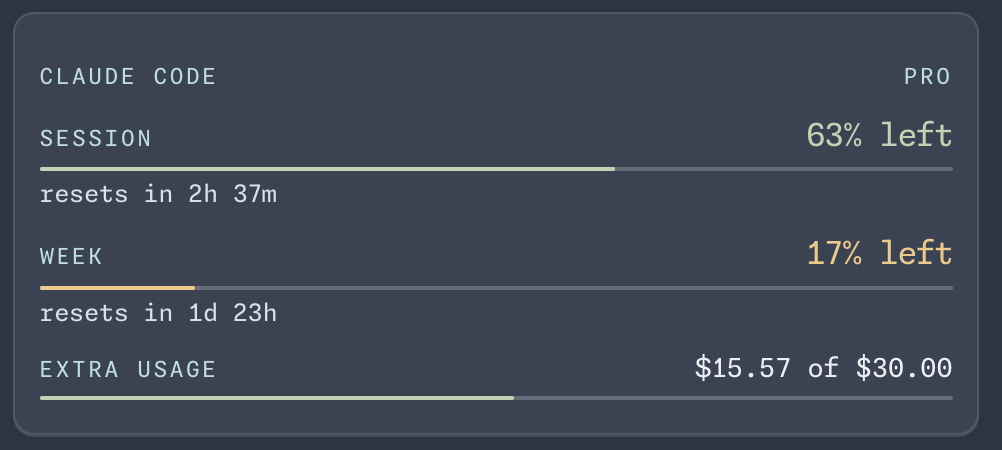
What happened: it showed up with my session and weekly limits, when each one resets, and my extra usage spend. The reason I wanted it is how I check that number today. Either I log into Claude, go through the menus to my account, and find the usage page, or I start Claude Code and type /status. Both take more clicks than they should. I have claude-hud in my terminal status line, but that only helps while a session is running. This is one glance from the menu bar, with nothing running.
That’s the pattern across this whole tab. I look at the same numbers in a bunch of places, and the places are a mix of asking my AI, digging through menus, and websites I keep pinned in collapsed Chrome tabs just so I can get to them fast.
9. The Idea Pile
Post ideas land in two places: single-idea notes in my Obsidian vault, and raw notes for reviews in the blog repo’s _drafts/ folder.
The wish:
Make a widget called "Ideas" that counts my post ideas in two folders:

1. "Vault ideas": .md files in /Users/eristoddle/Dropbox/Apps/remotely-save/Writing/20 Projects/30.02 Blogs/SM/Ideas
2. "Review notes": .md files in /Users/eristoddle/sm-static/_drafts

For each, show the count and the 3 most recently modified files by name (without .md), with "N days ago". Only look in those two folders, not their parents. Read-only.
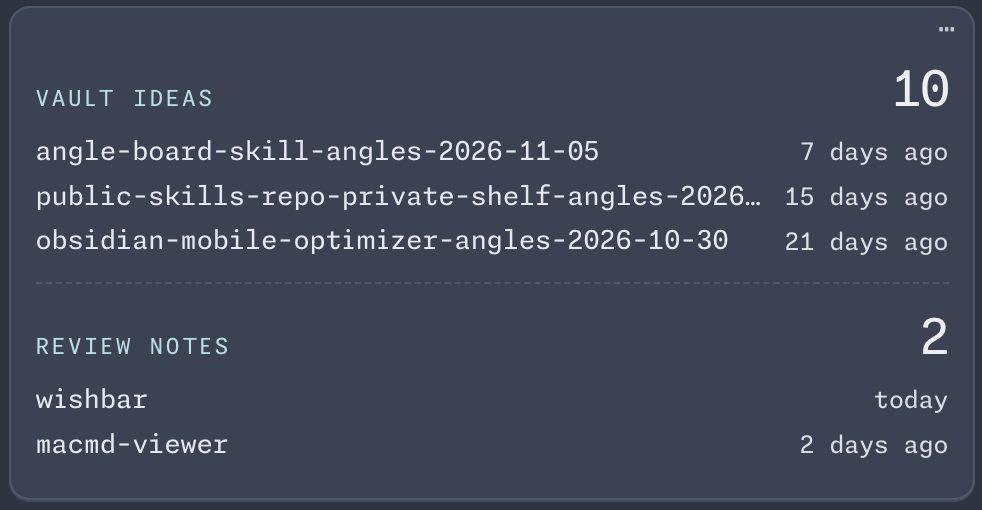
What happened: it worked. Ten idea notes in the vault, two review notes in the repo, and the three newest in each with how long ago they changed.
The Whole Tab
The panel isn’t a dashboard so much as a scrolling list, so one screenshot can’t show all of it. I put the Claude usage and Model Buzz widgets on the Home tab, where I’d want them all the time, and everything blog-related on the Blog tab. Here’s Home:
And here’s the top of the Blog tab. You scroll for the rest:
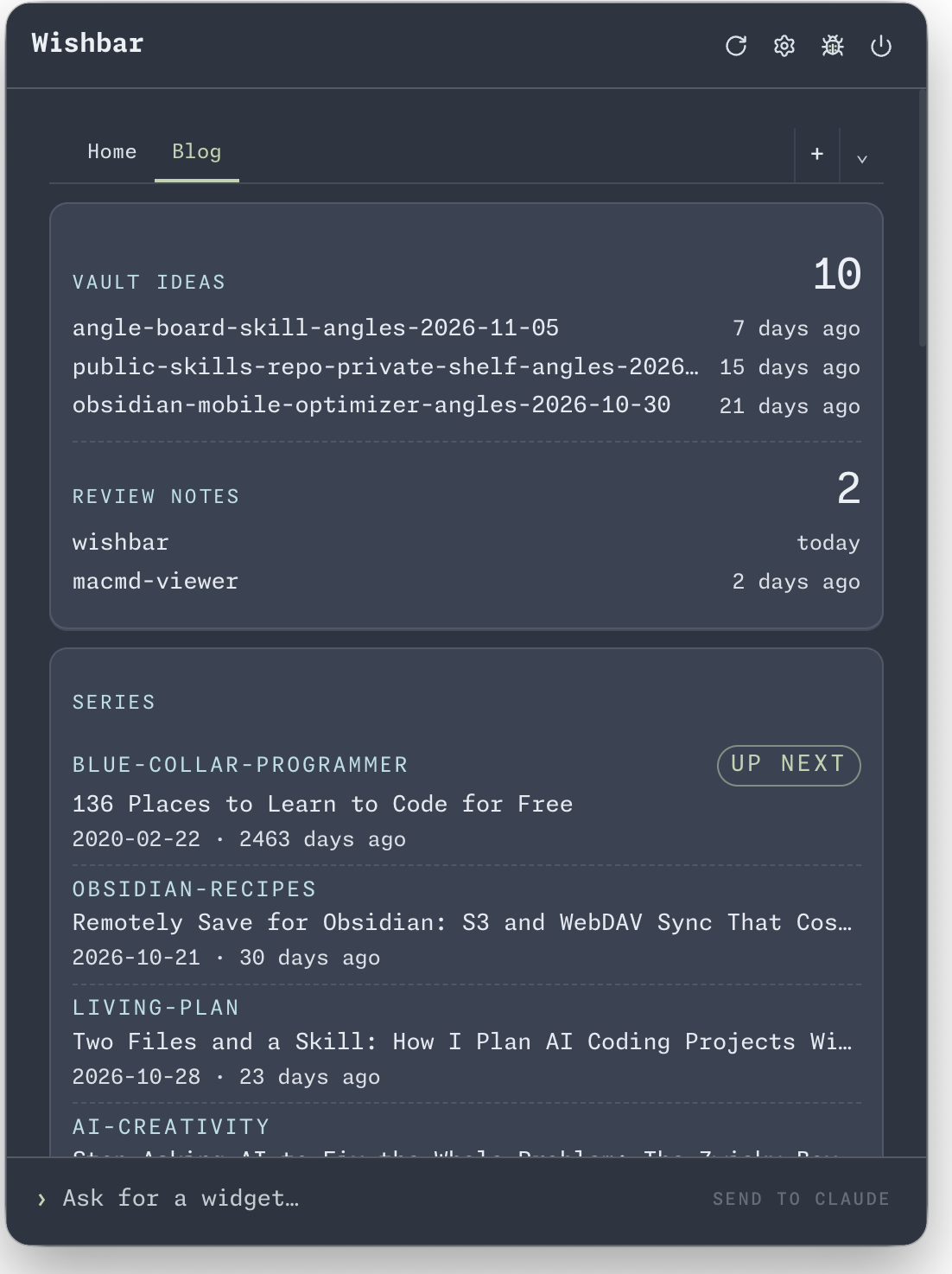
It took nine wishes, and eight of them worked on the first try. The exception was the GSC login, which took two, and that was me trying to get the agent to move the widget to another tab when the card’s three-dot menu does it in one click. Everything else came out right the first time. The tweaking now is about my prompts and what I want, not about the tool getting it wrong.
What made it worth it for me is that I can see things about my blog without starting a Claude session and asking.
What I’ll Wire Up Next
I kept tonight’s wishes to things that read files on my own Mac, because I didn’t want to spend the evening pasting API keys into widget settings. Now that I’ve seen what they do, I have a list.
Tweaks to what’s already there:
- One status widget. Combine “In progress,” the slots board and the publish branches into one full picture of where the blog stands.
- Open posts in my own editor. Clicking a draft opens VS Code now. I’d like it to open in my markdown writer.
- Smarter wishes. Teach the slots board about posts with a fixed date, make the branch watch ignore branches that are already merged, and skip paused series in the series widget.
And the next round, which needs credentials or another machine:
- Blog traffic today. Yesterday’s sessions and the top three pages from Google Analytics. Needs Google credentials in a widget, which is a good test of how Wishbar handles secrets.
- OpenRouter spend. One of the pinned tabs I keep collapsed in Chrome is my OpenRouter dashboard, just to see what I’ve been spending. That’s the same job as the Claude usage widget.
- Mini PC watcher. Is the server up, when did the last cron run, did Tuesday’s email go out. The reporting lives on the mini PC and Wishbar lives on the Mac, so a widget has to reach across: SSH, or a small status file the server publishes.
Every Dev Needs a Canvas
I could get an AI agent to do every one of these checks separately. Ask it in a terminal, get text back, forget to ask again next week. The other option is building an app to hold all of it, but that’s a whole project.
Wishbar is a third option: a canvas the agent builds into. You describe what you want, and it stays somewhere so you can use it later.
I’m keeping it. It puts a bunch of things I used to visit separate places to see into one panel. Now I open one thing.
Wishbar is at wishbar.app, with a 7-day free trial and no card.
* This website contains affiliate links. This means that if you click on a link and purchase a product or service, I may receive a small commission at no extra cost to you. Please note that I only recommend products and services that I believe in and that will add value to my readers. Not all links on this website are affiliate links. Learn more.
Related Posts

4 Fast Feed Readers that Handles Lots of Feeds without Slowing Down
Four feed readers that handle hundreds of feeds without slowing down, from someone who stopped installing software for one-off jobs.
Stupid Shiny Ribbon in Windows Live Writer 2011
It Started With Zemanta It all started when I noticed the Zemanta Windows Live Writer Plugin had an update, so I went to the page for the update. I love Zema...
There Is No Killer App
Reason Not to Blog #3: I just can’t find the right tool.