I Tried to Upgrade My Blog with AI Project Management and Everything Went to Hell (But the Process Worked Really Well)
Shortly after I started my first vibe coding project, I knew I took a wrong turn. There was no way I was going to be able to work on a larger project without planning and there was no way an AI tool was going to stick to a plan without a system. And I sort of abandoned that first project. If I do start on it again, I will start better.
Claude Code had at least some sort of guard rails when it came out, the CLAUDE.md file, but a few days into building an Electron app with Claude Code, I knew I needed more. So I rolled my own system using more markdown files. A file per feature and a reference to the file in the CLAUDE.md file. I am still working on this app using that system.
But while I was doing all of this coding work, I was looking at what other people were doing. I discovered I was at least going in the right direction, which is a good feeling. I also found some tools that were close to what I want to build, including:
- GitHub - superbasicstudio/claude-conductor: Claude Conductor - a simple Claude Code framework
- GitHub - MrLesk/Backlog.md: Backlog.md - A tool for managing project collaboration between humans and AI Agents in a git ecosystem
- GitHub - SuperClaude-Org/SuperClaude_Framework: A configuration framework that enhances Claude Code with specialized commands, cognitive personas, and development methodologies.
- GitHub - Jedward23/Tmux-Orchestrator
- GitHub - anubissbe/ProjectHub-Mcp: 🚀 Enterprise-grade task management web interface with time tracking, workflow templates, dependency visualization, team collaboration, and analytics dashboard. Built with React, TypeScript, and PostgreSQL.
- GitHub - BloopAI/vibe-kanban: Kanban board to manage your AI coding agents
Table of Contents
- Backlog.md: The Tool That Actually Made Sense
- From Zero to Kanban in 30 Seconds
- The /nexttask Prompt: Teaching Claude to Be Your Project Manager
- Smooth Sailing…With Caveats
- AI Musical Chairs: When Claude Credits Run Out Mid-Upgrade
- Why Backlog.md Actually Works
- Why I Rolled Back Anyway
- Lessons Learned: When Success Feels Like Failure
Backlog.md: The Tool That Actually Made Sense
After looking at all those options, I kept coming back to Backlog.md. Unlike the other tools that seemed to be reinventing project management or adding layers of complexity, this one felt like it was solving the exact problem I had.
The promise was simple: markdown-native tasks where you manage every issue as a plain .md file, plus an AI-ready CLI where you can literally tell Claude to “take over task 33.” After months of fighting with project management that lived outside my actual code, having everything in Git sounded like what I needed.
What made Backlog.md different from my adhoc Claude Code system was the structure. Instead of me manually creating feature files and maintaining references in CLAUDE.md, Backlog.md turns any folder with a Git repo into a self-contained project board powered by plain markdown files and a zero-config CLI. Each task becomes its own markdown file with a naming convention that actually makes sense: task-[task-id] - [task-title].md (like task-12 - Fix typo.md).
Instead of maintaining a growing CLAUDE.md file with references to feature files, I’d get persistent task cards that AI tools could pick up individually. No more context bloat, no more losing track of what was planned versus what was implemented.
The installation options are simple: npm i -g backlog.md or bun add -g backlog.md, plus Homebrew if you want. Plus, 100% private and offline operation with the backlog living entirely inside your repo. No external dependencies or vendor lock-in.
I decided to test this theory on the perfect guinea pig: this ancient Jekyll blog that I’d been afraid to touch for years, mainly because I knew what a rabbit hole that can be.
From Zero to Kanban in 30 Seconds
Installing Backlog.md with bun was easy:
bun add -g backlog.md
Once that finished, I navigated to my blog’s folder and ran:
backlog init "Blog Upgrade Project"
This is where I knew I chose the right tool. The zero-config CLI wasn’t marketing bullshit. It actually just worked. The init command created a .backlog folder in my project with a basic configuration file.
Then it was time to create the files for the AI tools I was going to use.

I had it create one for Claude Code and one for Gemini CLI.
And I knew I could create a task manually, like this:
backlog task create "Upgrade this ancient Jekyll blog"
But I wanted to use the web interface for a visual. It pretty basic but it works well and gets the job done. The only issue I had was that you have to remember to refresh the page after your AI tool updates task, but that was really no biggie.
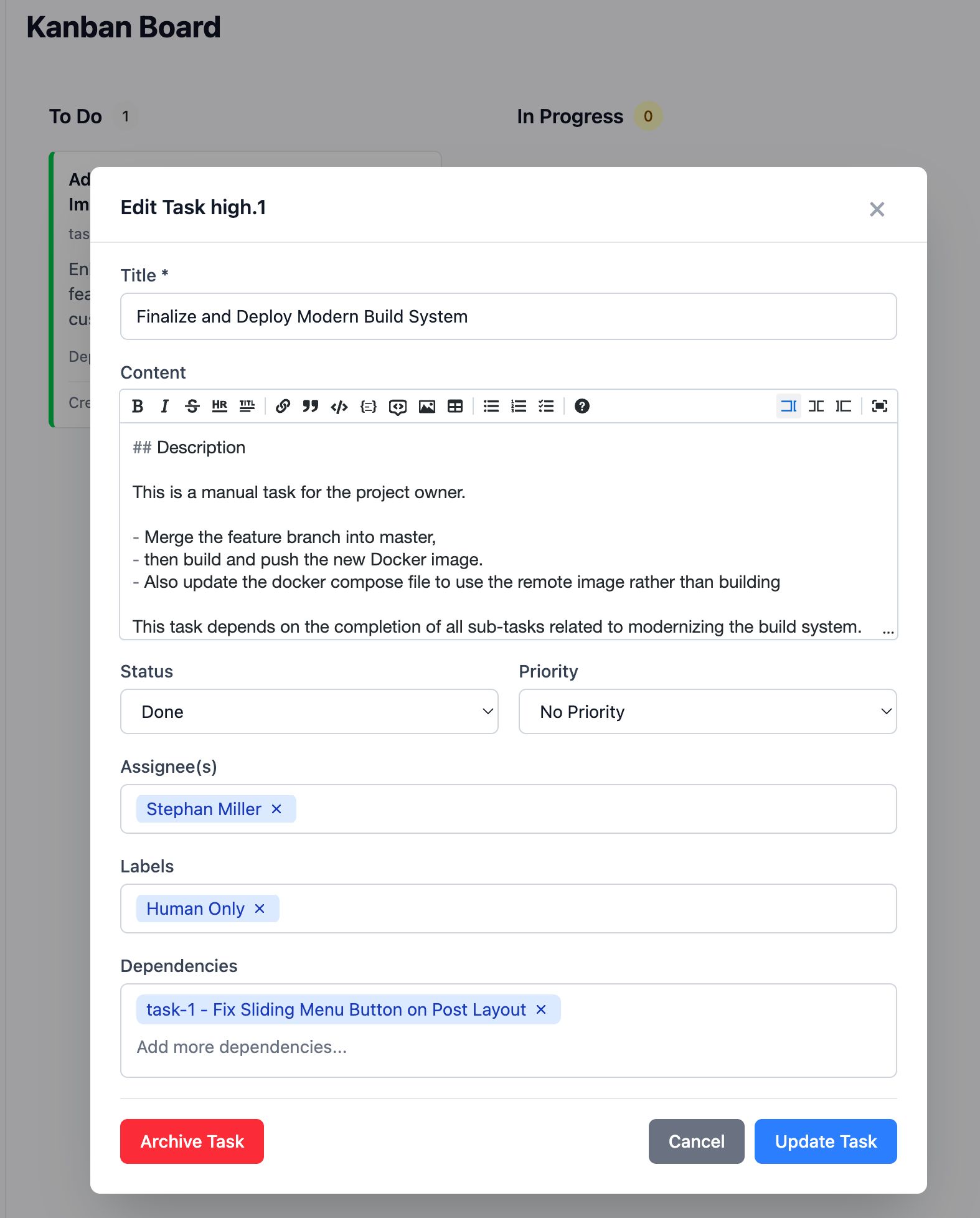
Run this command to launch the web app:
backlog browser
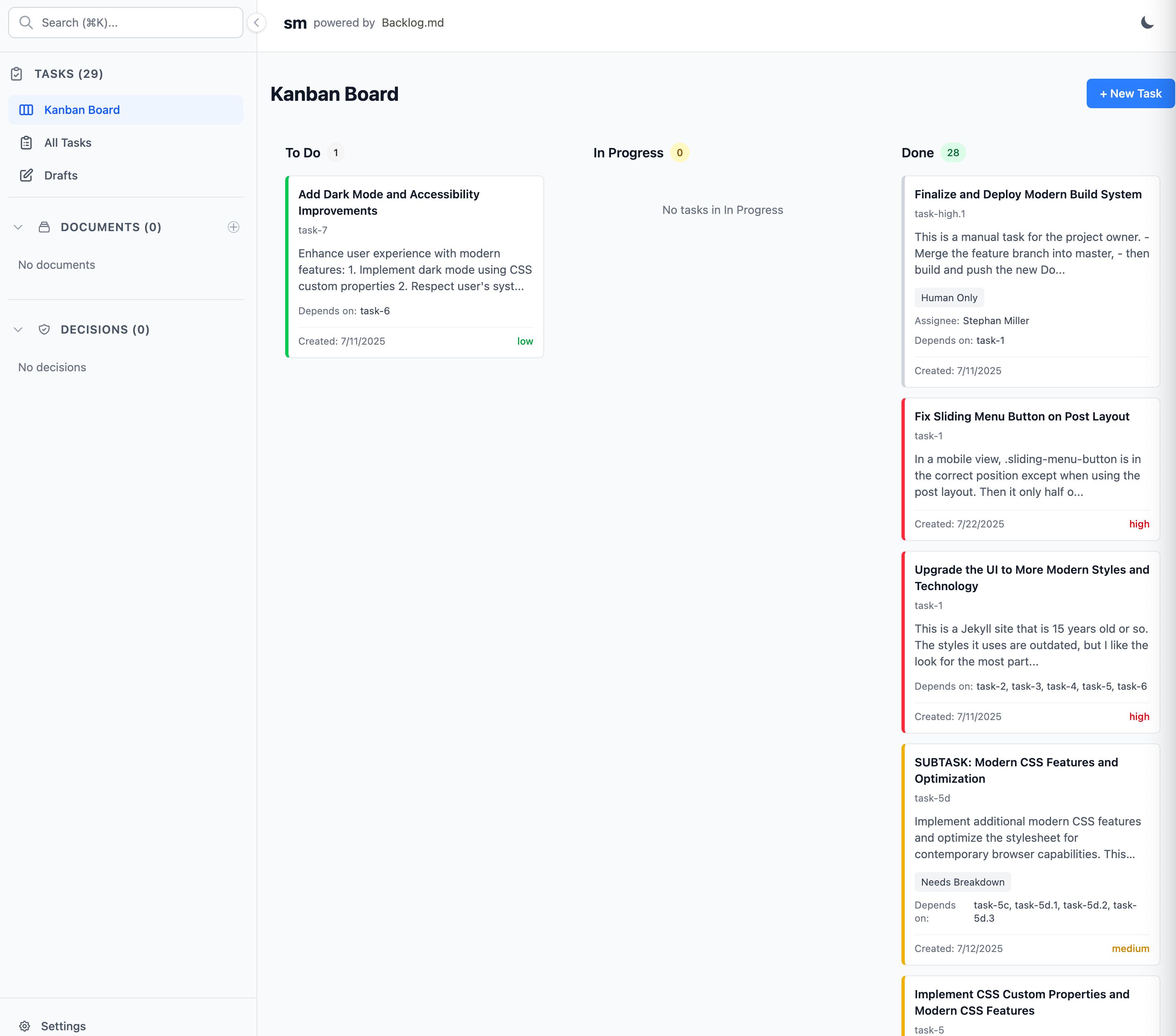
I could also run:
backlog board view
A kanban board appeared right in my terminal, showing my single task in the “To Do” column. It was basic, but seeing that visual representation made something click. This was project management that lived with my code and could scale as simply as creating more markdown files.
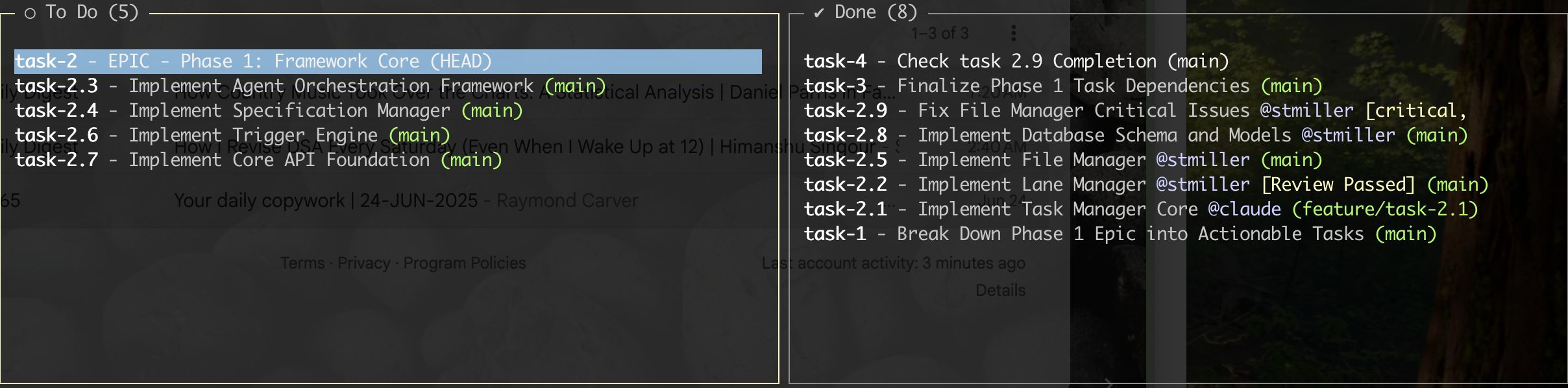
Everything was just files in my repo. I could version control my project management, branch it with my code, and most importantly, any AI agent could understand the entire project context by reading well-structured markdown files instead of parsing through massive CLAUDE.md files or chat histories.
The /nexttask Prompt: Teaching Claude to Be Your Project Manager
I had only recently started creating custom Claude Commands instead of typing a different prompt every time. I figured since I had a structured way of handling tasks, I should create a command to get Claude Code to work on the next task. It was pretty simple:
Analyze the next task by priority and dependencies then sort order in the TODO column. Analyze the project to determine the scope. If the task is the right size for one task, move it to doing and start working on it. When it is done, mark it as done and add a “Needs Review” label. Do not make a git commit. If the task is too large, break it up into new tasks and add them as a dependency to the original task, then stop and tell me.
I have since made this command much longer and now have the agent create a git branch for each new task it started working on, but this command got the job done. I would review the tickets that were tagged with “Needs Review” and then just archive the tickets after I checked they were actually done.
This was the one task I created (I will find out at then end everything that I should have made this more detailed):
This is a Jekyll site that is 15 years old. The styles it uses are outdated, but I like the look for the most part. It is even relatively responsive. Create a new branch and work on a theme updated to to modern standards. I like that my current theme is plain like reading from paper.
The first time I ran the /nexttask command, it split the ticket into 7 new tickets and updated it and appended this:
**Status**: This task has been broken down into specific subtasks (task-2 through task-7) that should be completed in sequence. Each subtask focuses on a specific aspect of the modernization:

1. **task-2**: Update dependencies (Font Awesome, jQuery)

2. **task-3**: Migrate grid system from Bourbon/Neat to CSS Grid/Flexbox

3. **task-4**: Modernize build system (replace Grunt)

4. **task-5**: Implement CSS custom properties and modern CSS features

5. **task-6**: Performance optimization and asset loading

6. **task-7**: Add dark mode and accessibility improvements

## Notes

- New branch `ui-modernization` has been created for this work

- Current analysis shows the site uses Skinny Bones theme with outdated Bourbon/Neat grid system

- Focus should be on preserving the clean, paper-like reading experience while modernizing the underlying technology
I didn’t expect the amount of tickets this command would eventually generate though, because it would hit one of these tickets and break it done further. The process worked, but I was never quite sure when it was going to end…until the end. By then, it had created 29 tasks.
Smooth Sailing…With Caveats
The first task Claude picked up was “Update Dependencies - Font Awesome and jQuery” and it went well. Like, suspiciously well. It identified the outdated versions, updated the package references, tested the build, and marked the task as done. I started getting cocky thinking this whole process was going to be easy, like I alway do in the beginning.
Then we hit the CSS Grid migration and reality came crashing back down. What started as “Migrate from Bourbon/Neat to CSS Grid and Flexbox” immediately spawned three more subtasks when Claude realized the scope. Those three subtasks each spawned their own subtasks.
By the time we were deep into the UI changes, I was hitting about a 50% success rate. Half the time Claude would implement something perfectly and move on. The other half, I’d test the changes and find broken layouts and missing responsive behavior.
But I was used to this when vibe coding. Builds and CSS aren’t fun, and they’re definitely not the kind of work that AIs handle gracefully every time. The difference was that instead of losing track of what was broken in a long chat thread, I had persistent task cards showing exactly what needed fixing and what had already been tested.
AI Musical Chairs: When Claude Credits Run Out Mid-Upgrade
Right in the middle of debugging a responsive layout issue, I got the message from Claude Code that I was about to be cut off for about 3 hours or so. Perfect timing!
So I decided I’d give Gemini CLI a try. The Pro model actually did pretty well at first, but since I am on the free tier there, that did not last very long. So it wasn’t long before the Flash model took over and starting breaking things and making obvious mistakes.
But it was about dinner time, so I gave up and that and came back when I could use Claude Code again. I missed the workflow I could use there and that I could tell it to “think harder” when I knew it was stuck. But Backlog.md still kept track of things, so it wasn’t hard to pick where I left off.
Why Backlog.md Actually Works
After trying three different approaches to AI-assisted project management, Backlog.md finally clicked because it solved the fundamental problem: persistence without complexity.
With Claude Desktop and MCPs, I was constantly losing context when conversations got too long or when I had to start new chats. Every time I came back to a project, I had to re-explain where I was and what I was trying to accomplish. It was like having amnesia every few hours.
Claude Code’s CLAUDE.md files were better, but they became unwieldy fast. By the time I had detailed feature plans, code style guidelines, and project status all crammed into one file, it was thousands of lines of text that Claude had to parse every time. Plus, managing references to separate feature files was manual work that I inevitably screwed up.
Backlog.md gives you the power of having prompts as persistent cards instead of buried in chat histories or monolithic project files. Each task is self-contained with its own context, acceptance criteria, and history. When an AI picks up a task, it gets exactly the information it needs without wading through everything else. And since everything lives in your repository, there are no external dependencies to break or expire.
The Backlog.md Workflow That Actually Works
Here’s the simple process that emerged:
- Create tasks:
backlog task create "Fix responsive header"generates a markdown file with all the context - View progress:
backlog board viewshows your terminal kanban board instantly - Hand off to AI: Point Claude/Gemini at specific task files instead of explaining everything
- Track changes: Git automatically versions your project management along with your code
- Review visually:
backlog browserlaunches a web interface when you want something prettier than terminal output
Key commands I used constantly:
backlog task create- Generate new task filesbacklog board view- Terminal kanban boardbacklog browser- Web-based project viewbacklog task edit <id>- Update task details without hunting for files
Why I Rolled Back Anyway
Just because I thought something was worth doing doesn’t mean it was the best way to do it. The blog upgrade process worked perfectly, but the end result was objectively worse than what I started with. I really just wanted to remove old styles that used floats and other ancient methods and replace them with things like flexbox. The truth is, I forgot how to use some of the old styles. But I got carried away when Claude suggested all the changes. I thought, “Might as well.”
But:
- The old Docker images was 300 mb. The new one was 500 mb.
- The build time doubled.
The final straw was the JavaScript heap out of memory errors that started appearing during the watch process. I thought about it. I could keep trying to get this new build to work right or I could roll back. I rolled back. But at least I learned some things from the process.
Lessons Learned: When Success Feels Like Failure
A “failed” upgrade taught me more than a successful one would have because failure forces you to examine your assumptions. I learned that just because you can modernize something doesn’t mean you should, and that the process of building something can be more valuable than the thing you build.
The evolution from Claude Desktop to Claude Code to Backlog.md shows how AI project management is still figuring itself out. We’re all just throwing stuff at the wall to see what sticks. But Backlog.md actually stuck, which is more than I can say for most of the “revolutionary” AI tools that get hyped every week.
Proper task management changes AI-assisted coding by giving both you and the AI clear context about what needs to be done, what’s been tried, and what’s working. Instead of the AI guessing what you want based on a conversation, it can read explicit requirements and build exactly what’s specified.
I’m keeping Backlog.md in my toolkit even though this project was a disaster. Sometimes the best recommendations come from watching something work perfectly while everything else falls apart around it. It also got updated while I was working on this article and has new features, including new commands and more functionality in the web app. The tool is actively being developed, which is always a good sign for something you’re planning to rely on.
Related Posts

I Burned Out on Vibe Coding, Came Back, and Rewrote Everything
After months away from side projects, I came back and realized my vibe-coded apps were prototypes. So I started over.

Verdent AI - When Your AI Coding Assistant Finishes Before You Can Get Coffee
I expected the same old process with coding tools and then was given a beta account for Verdent.
The Great Vibe Coding Experiment - How I Built 15 Projects with AI in My Spare Time
Plus the 80 page vibe coding/spec-driven development report Claude generated from my Obsidian notes for me

How I Built Two Obsidian Plugins While Kiro AI Did Most of the Work
Kiro helped me build two Obsidian plugins in 6-8 hours.