
Exporting Mac OSX Book Highlights into an Obsidian Vault or Markdown Files
Readwise is a great idea, but probably really useful for someone who highlights and takes notes on more platforms. It will really help consolidate them. But I mainly highlight ebooks. The whole reason I use Readwise is to get those highlights and notes into Obsidian. When I take notes on the web, I use the Obsidian Web Clipper and send highlights directly to Obsidian. I can even do this on my iPad, once I discovered the Orion Web Browser, which allowed me to install the Chrome plugin. There is also a Readwise Web Clipper iOS app that works with Safari.
Which I why I went hunting for a way to import these highlights and notes without a subscription.
Note: I did write a native Obsidian Apple annotation import plugin, you can find its git repo here.
Using Readwise to Import Highlights into Obsidian
Readwise will retrieve highlights and bookmarks semi-automatically from the books you buy from Kindle, by going into the Readwise app and clicking a button. If you upload them to Kindle or need highlights from the Apple Books app, you’ll have to open the book, go to your highlights, select them all, and then email them to the Readwise email address: add@readwise.com.
Then when you open your Obsidian vault where the Readwise plugin is installed, it imports all your highlights as notes. The configuration setting in the plugin are pretty simple but they do the job:
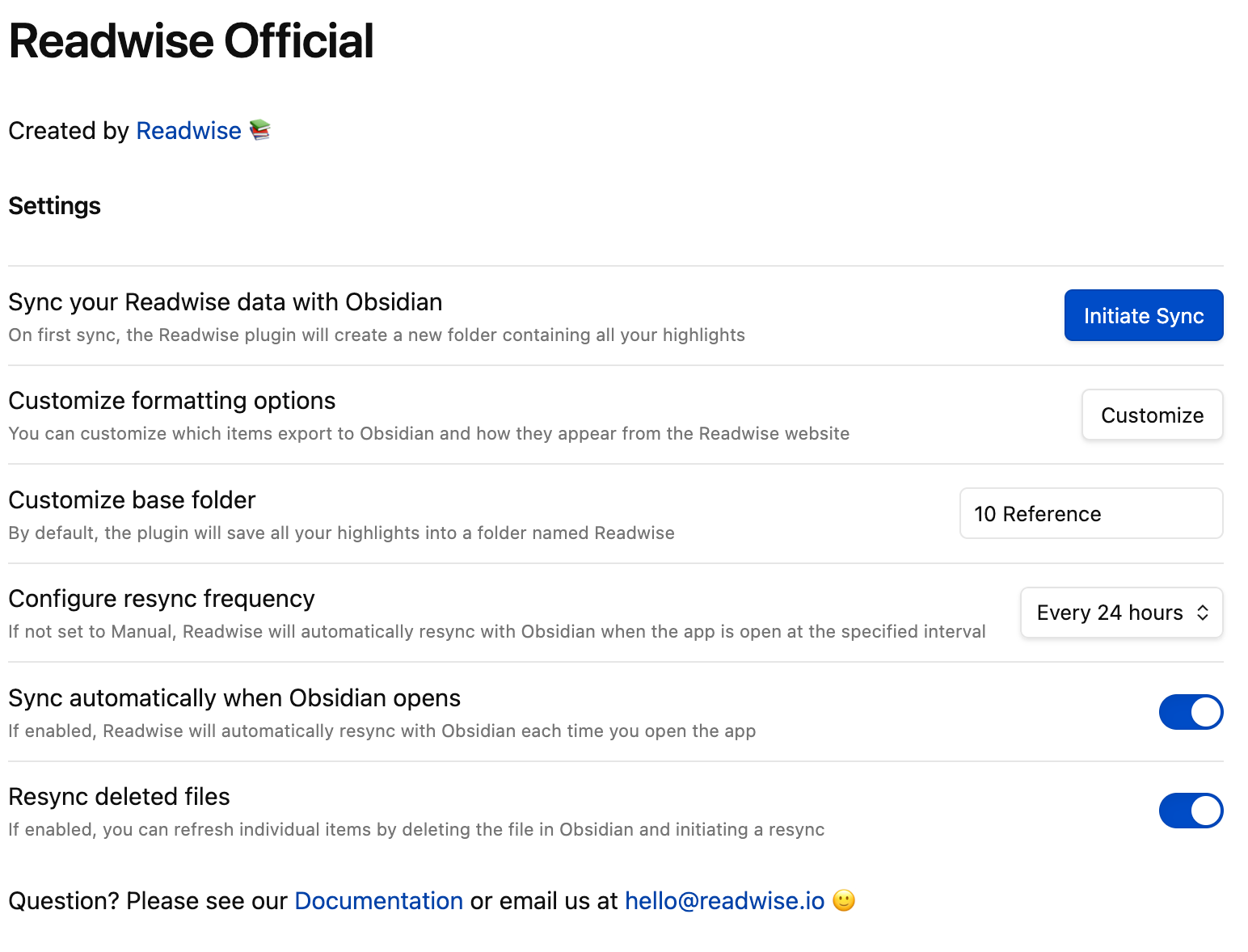
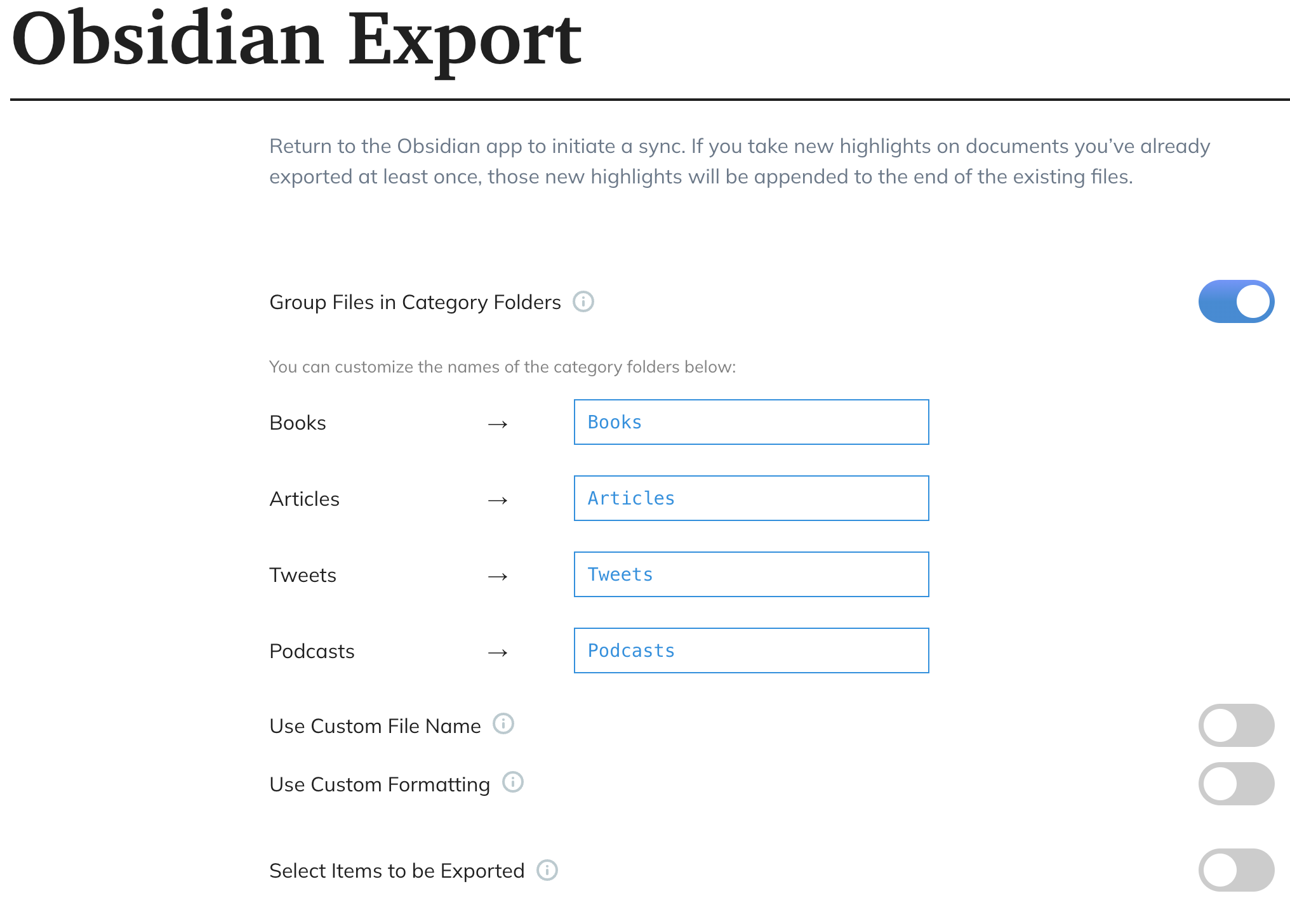
But these aren’t all the settings for the import. Part of the configuration is on the Readwise site in the export configuration page. You can get there by clicking on the Customize button.
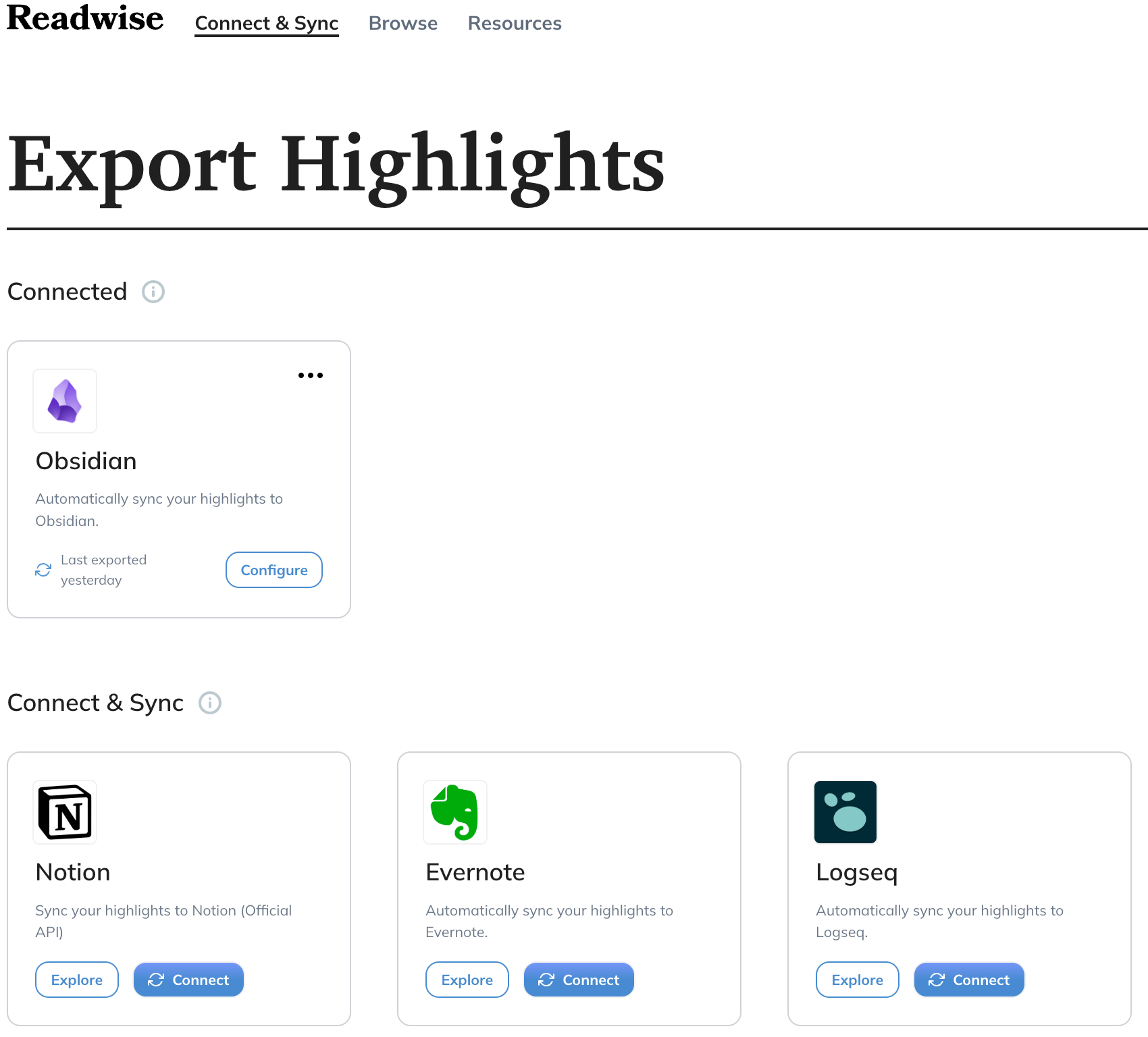
By clicking on the Obsidian integration card, you can configure a few more things:
The default template for highlights creates a note that looks like this:
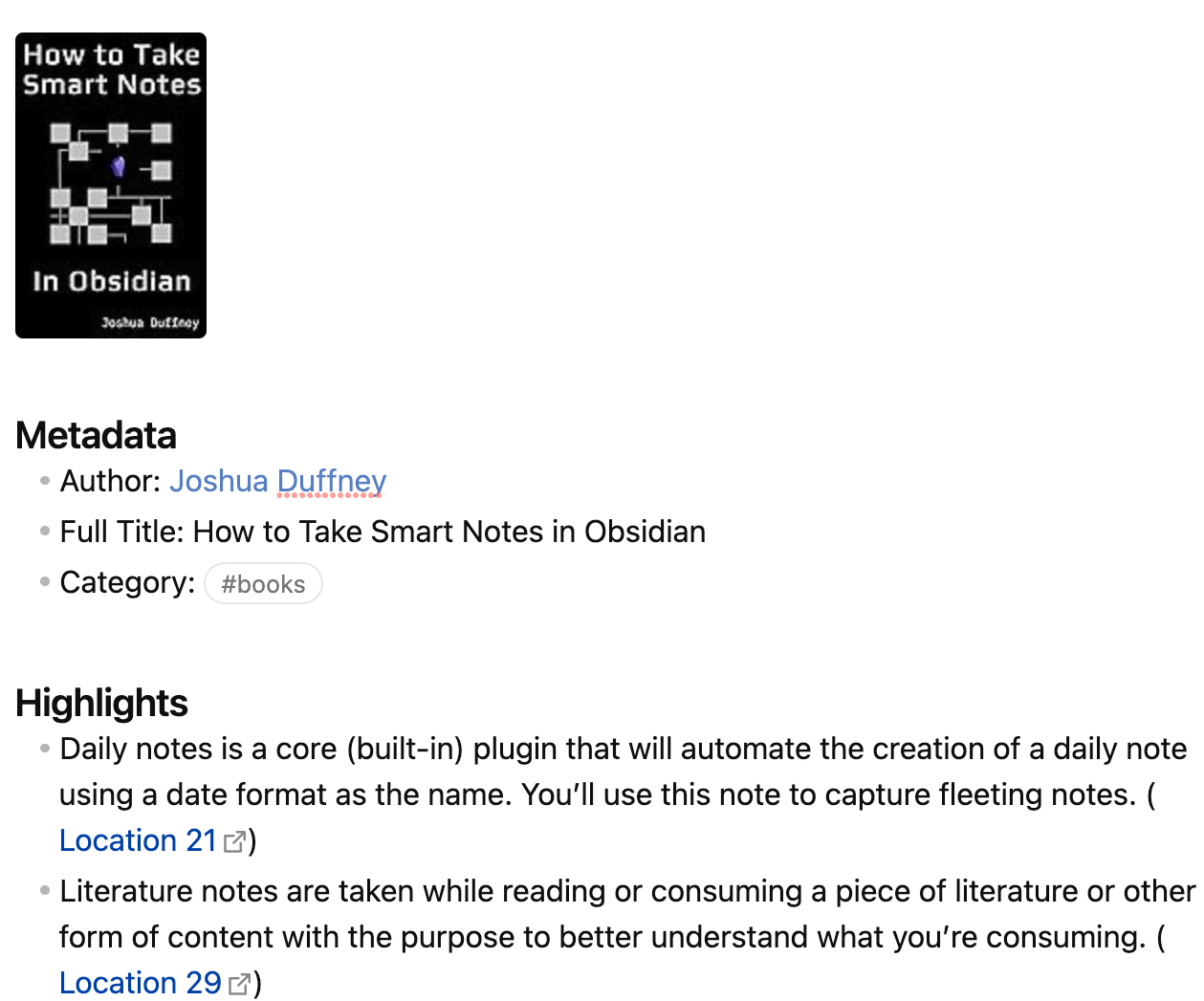
One thing I’ve planned to get to but haven’t yet is customizing the template for the export by clicking on Use Custom Formatting, because by default it doesn’t add any yaml frontmatter, which I want. It seems pretty flexible:
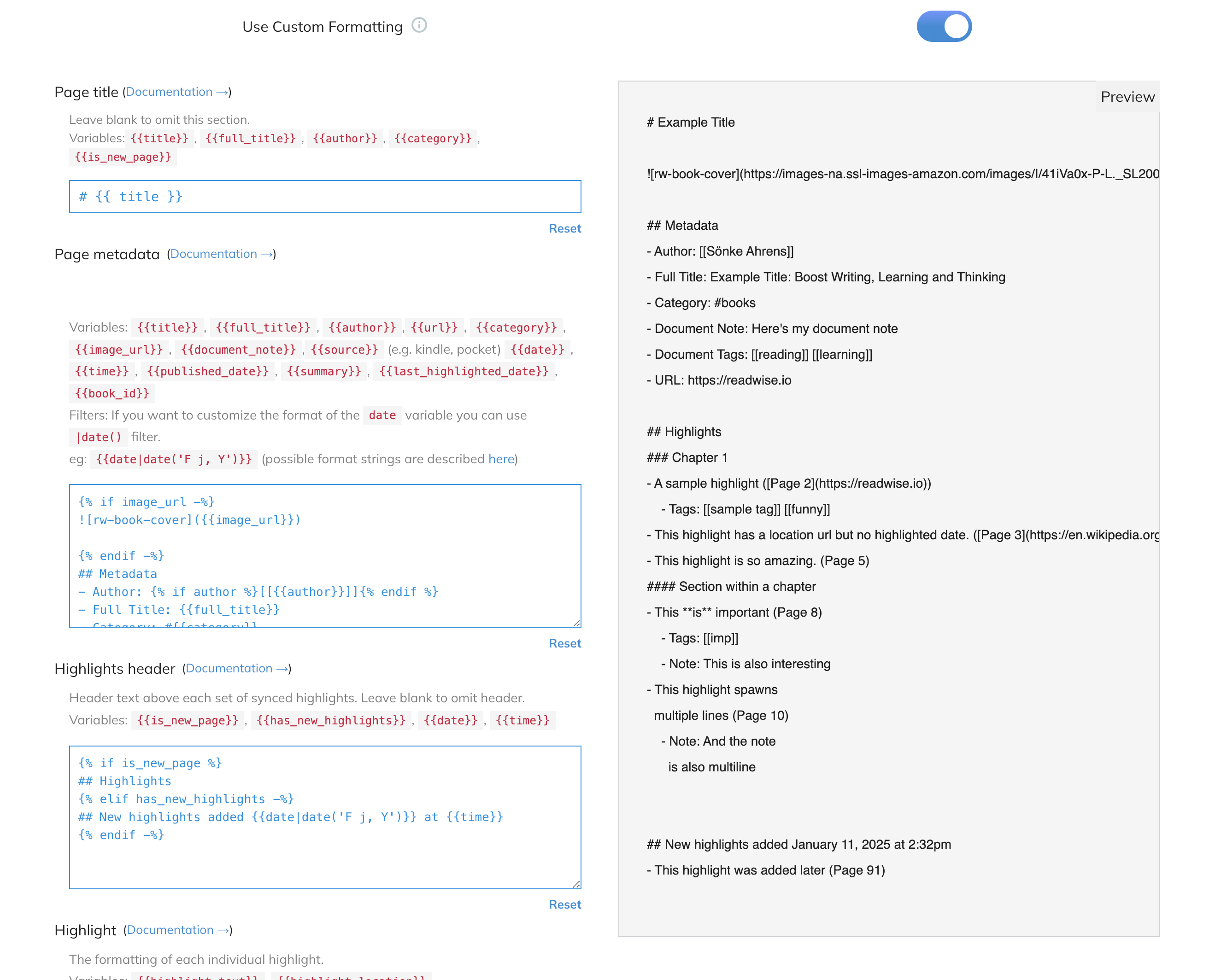
But because I thought that maybe I could recreate this email and import feature myself, I started experimenting.
Obsidian Plugin to Import Emailed Ebook Highlights
This was my first idea, since I had to do this with most of my ebooks when I used Readwise anyway and I started creating the plugin to work with Gmail. It semi-works, but it is kind of clunky and a pain in the ass and I’m not sure I will go back to work on it. One reason is that working with the Gmail API is not fun. I would have to create a service to handle that if I wanted to release it for the community. Another is that I get very limited metadata when I email the highlights and it would be nice to have more.
And then I found out that the OSX Books app stores all information on highlights and notes in an open, though hard to find, SQLite database. You can see how Calibre imports these highlights here. I import most of the ebooks I already own into the Books app and buy most of my ebooks on Kindle, where I am hoping there is an API that Readwise uses which I can figure out how to use. That’s for another blog post though. But with this script and hopefully a Kindle API, I’ll get all of my book highlights into Obsidian.
Importing Apple Books Highlights into Obsidian with Python (or Just Into a Folder)
Yes, the title says “with Python”, but you don’t need to know how to write code, just follow a few instructions. The Python script below will also work standalone to export highlights in markdown format.
Requirements
- Install the Obsidian Python Scripter plugin. You can find it by searching community plugins in Obsidian
- Optional: Install the Python ebooklib library. With this installed, it uses the path of the ebook that’s in the SQLite database to get even more metadata as well as the cover image, if it’s available.
If you are unfamiliar with installing Python libraries, open the Terminal app and type the following line to install ebooklib. It will run without ebooklib, but will provide less data:
pip install ebooklib
Python OSX Book Highlight Export Script
Then download this Python script as osx_book_notes.py from this gist. I updated this on 5/27/2025:
import os
import glob
import sqlite3
import logging
import sys
import re
from typing import List, Tuple, NamedTuple, Optional

ANNOTATION_DB_PATTERN = "~/Library/Containers/com.apple.iBooksX/Data/Documents/AEAnnotation/AEAnnotation*.sqlite"
LIBRARY_DB_PATTERN = (
    "~/Library/Containers/com.apple.iBooksX/Data/Documents/BKLibrary/BKLibrary*.sqlite"
)
logging.basicConfig(
    level=logging.ERROR, format="%(asctime)s - %(levelname)s - %(message)s"
)


class BookDetail(NamedTuple):
    asset_id: str
    title: str
    author: str | None
    description: str | None
    epub_id: str | None
    path: str | None
    isbn: str | None
    language: str | None
    publisher: str | None
    publication_date: str | None
    cover: str | None


def sanitize_frontmatter(text: str) -> str:
    if not text:
        return ""

    replacements = {
        ":": " -",
        "[": "(",
        "]": ")",
        "{": "(",
        "}": ")",
        "#": "",
        "|": "-",
        ">": "-",
        "\\": "/",
        "\n": " ",
        "\r": " ",
    }

    result = str(text)
    for char, replacement in replacements.items():
        result = result.replace(char, replacement)

    result = " ".join(result.split())

    return result.strip()


def extract_chapter_from_cfi(cfi: str) -> Optional[str]:
    """
    Extract chapter information directly from CFI string.

    Examples:
    'epubcfi(/6/12[chapter_4]!/4/10/1,:0,:4)' -> 'Chapter 4'
    'epubcfi(/6/24[c3.xhtml]!/4/188/2/1,:0,:1)' -> 'Chapter 3'
    'epubcfi(/6/16[AHR5106_US-Trade_BBP-Text-3]!/...)' -> 'Preface'
    """
    if not cfi:
        return None

    try:
        # Extract content in brackets from CFI
        bracket_match = re.search(r"\[([^\]]+)\]", cfi)
        if not bracket_match:
            return None

        chapter_id = bracket_match.group(1)

        # Handle different chapter naming patterns
        if "chapter_" in chapter_id.lower():
            # Extract number from 'chapter_4' -> 'Chapter 4'
            chapter_num = re.search(r"chapter_(\d+)", chapter_id.lower())
            if chapter_num:
                return f"Chapter {chapter_num.group(1)}"

        elif (
            chapter_id.lower().startswith("c")
            and chapter_id[1:].split(".")[0].isdigit()
        ):
            # Handle 'c3.xhtml' -> 'Chapter 3'
            chapter_num = re.search(r"c(\d+)", chapter_id.lower())
            if chapter_num:
                return f"Chapter {chapter_num.group(1)}"

        elif "preface" in chapter_id.lower() or "foreword" in chapter_id.lower():
            return "Preface"

        elif "introduction" in chapter_id.lower() or "intro" in chapter_id.lower():
            return "Introduction"

        elif "appendix" in chapter_id.lower():
            return "Appendix"

        elif "title" in chapter_id.lower():
            return "Title Page"

        elif "text" in chapter_id.lower():
            # Handle generic text sections - try to make them readable
            if "text-2" in chapter_id.lower():
                return "Preface"
            elif "text-3" in chapter_id.lower():
                return "Preface (continued)"
            elif "text-5" in chapter_id.lower():
                return "How to Begin"
            else:
                return "Text Section"

        else:
            # Fallback: clean up the raw chapter ID
            cleaned = chapter_id.replace("_", " ").replace("-", " ")
            return cleaned.title()

    except Exception:
        return None


def get_chapter_from_cfi_original(epub_path: str, location: str) -> str | None:
    """Original function - renamed for clarity and used as fallback"""
    try:
        import ebooklib
        from ebooklib import epub

        book = epub.read_epub(epub_path)

        # Handle location like "epubcfi(/6/12[chapter_4]!/4/10/1,:0,:4)"
        chapter_match = re.search(r"\[([^\]]*)\]", location)
        if chapter_match:
            chapter_id = chapter_match.group(1)

            # Look through TOC for matching chapter
            def search_toc(items):
                for item in items:
                    if isinstance(item, tuple):
                        section, href = item
                        if chapter_id in str(href):
                            return section
                        # Handle nested TOC
                        if isinstance(section, tuple):
                            result = search_toc(section)
                            if result:
                                return result
                return None

            return search_toc(book.toc)

    except Exception as e:
        print(f"Error getting chapter: {e}")
        return None

    return None


def get_chapter_display_name(
    cfi: str, epub_path: str = None, fallback_method: bool = True
) -> Optional[str]:
    """
    Get chapter name with fallback to the original method if needed.
    """
    # Try the new CFI-based method first
    chapter = extract_chapter_from_cfi(cfi)
    if chapter:
        return chapter

    # Fallback to original method if available and requested
    if fallback_method and epub_path:
        return get_chapter_from_cfi_original(epub_path, cfi)

    return None


def get_epub_metadata(epub_path: str):
    try:
        import ebooklib
        from ebooklib import epub
        import base64

        if not epub_path:
            return None

        try:
            book = epub.read_epub(epub_path)

            metadata = {
                "isbn": next(
                    (
                        val
                        for _, val in book.get_metadata("DC", "identifier")
                        if isinstance(val, str) and "isbn" in val.lower()
                    ),
                    None,
                ),
                "language": next(
                    (val[0] for val in book.get_metadata("DC", "language")), None
                ),
                "publisher": next(
                    (val[0] for val in book.get_metadata("DC", "publisher")), None
                ),
                "publication_date": next(
                    (val[0] for val in book.get_metadata("DC", "date")), None
                ),
            }

            cover_base64 = None
            for item in book.get_items():
                if item.get_type() == ebooklib.ITEM_COVER:
                    cover_data = item.get_content()
                    cover_base64 = base64.b64encode(cover_data).decode("utf-8")
                    break

            metadata["cover"] = cover_base64
            return metadata

        except Exception as e:
            print(f"Error reading epub: {e}")
            return None

    except ImportError:
        return None


def get_db_path(pattern: str) -> str:
    paths = glob.glob(os.path.expanduser(pattern))
    if not paths:
        raise FileNotFoundError(f"No database found matching pattern: {pattern}")
    return paths[0]


def get_book_details() -> List[BookDetail]:
    try:
        with sqlite3.connect(get_db_path(LIBRARY_DB_PATTERN)) as conn:
            cursor = conn.cursor()
            cursor.execute(
                """SELECT ZASSETID, ZSORTTITLE, ZSORTAUTHOR, ZBOOKDESCRIPTION, ZEPUBID, ZPATH
              FROM ZBKLIBRARYASSET"""
            )
            return [
                BookDetail(
                    asset_id=row[0],
                    title=row[1],
                    author=row[2],
                    description=row[3],
                    epub_id=row[4],
                    path=row[5],
                    isbn=None,
                    language=None,
                    publisher=None,
                    publication_date=None,
                    cover=None,
                )
                for row in cursor.fetchall()
            ]
    except sqlite3.Error as e:
        logging.error(f"Database error: {e}")
        raise


def get_books_with_highlights() -> List[str]:
    book_ids = [book.asset_id for book in get_book_details()]
    placeholders = ",".join("?" for _ in book_ids)
    try:
        with sqlite3.connect(get_db_path(ANNOTATION_DB_PATTERN)) as conn:
            cursor = conn.cursor()
            cursor.execute(
                f"""SELECT DISTINCT ZANNOTATIONASSETID
                              FROM ZAEANNOTATION
                              WHERE ZANNOTATIONASSETID IN ({placeholders})
                              AND ZANNOTATIONSELECTEDTEXT != "";""",
                book_ids,
            )
            return [entry[0] for entry in cursor.fetchall()]
    except sqlite3.Error as e:
        logging.error(f"Database error: {e}")
        raise


def parse_cfi_for_sorting(cfi: str) -> Tuple[int, ...]:
    """
    Parse an EPUB CFI string and return a tuple of numbers for sorting.

    Example: 'epubcfi(/6/24[c3.xhtml]!/4/188/2/1,:0,:1)'
    Returns: (6, 24, 4, 188, 2, 1, 0, 1)
    """
    if not cfi or not cfi.startswith("epubcfi("):
        return (0,)  # Default for invalid CFI

    try:
        # Remove 'epubcfi(' and ')' and split by common delimiters
        content = cfi[8:-1]  # Remove 'epubcfi(' and ')'

        # Extract all numbers from the CFI
        numbers = []

        # Split by major sections (! separates different parts)
        parts = content.split("!")

        for part in parts:
            # Find all numbers in each part, ignoring text in brackets
            # Remove bracketed content first
            clean_part = re.sub(r"\[[^\]]*\]", "", part)
            # Extract numbers
            nums = re.findall(r"\d+", clean_part)
            numbers.extend([int(n) for n in nums])

        return tuple(numbers) if numbers else (0,)

    except Exception:
        return (0,)


def export_annotations(
    asset_id: str, book_details: List[BookDetail], file_path: str, extra_meta: dict
) -> None:
    try:
        with sqlite3.connect(get_db_path(ANNOTATION_DB_PATTERN)) as conn:
            cursor = conn.cursor()
            # Get all annotations without ordering first
            cursor.execute(
                """SELECT ZANNOTATIONSELECTEDTEXT, ZANNOTATIONNOTE, ZANNOTATIONLOCATION,
                        ZPLABSOLUTEPHYSICALLOCATION
                        FROM ZAEANNOTATION
                        WHERE ZANNOTATIONASSETID = ? AND ZANNOTATIONSELECTEDTEXT != "";""",
                (asset_id,),
            )
            annotations = cursor.fetchall()
    except sqlite3.Error as e:
        logging.error(f"Database error: {e}")
        raise

    # Sort annotations by CFI location
    def cfi_sort_key(annotation):
        return parse_cfi_for_sorting(
            annotation[2]
        )  # annotation[2] is ZANNOTATIONLOCATION

    sorted_annotations = sorted(annotations, key=cfi_sort_key)

    create_file(book_details, sorted_annotations, file_path, extra_meta)


def export_annotations_simple_numeric_sort(
    asset_id: str, book_details: List[BookDetail], file_path: str, extra_meta: dict
) -> None:
    """
    Simpler approach: extract the first few numbers from CFI and sort by those.
    This works well for books with consistent CFI structure.
    """
    try:
        with sqlite3.connect(get_db_path(ANNOTATION_DB_PATTERN)) as conn:
            cursor = conn.cursor()
            cursor.execute(
                """SELECT ZANNOTATIONSELECTEDTEXT, ZANNOTATIONNOTE, ZANNOTATIONLOCATION
                              FROM ZAEANNOTATION
                              WHERE ZANNOTATIONASSETID = ? AND ZANNOTATIONSELECTEDTEXT != "";""",
                (asset_id,),
            )
            annotations = cursor.fetchall()
    except sqlite3.Error as e:
        logging.error(f"Database error: {e}")
        raise

    # Simple sort by extracting main chapter/section numbers
    def simple_cfi_sort_key(annotation):
        cfi = annotation[2] or ""
        # Extract the main chapter number (e.g., /6/24 -> [6, 24])
        numbers = re.findall(r"/(\d+)", cfi)
        return [int(n) for n in numbers[:3]]  # Use first 3 levels for sorting

    sorted_annotations = sorted(annotations, key=simple_cfi_sort_key)

    create_file(book_details, sorted_annotations, file_path, extra_meta)


def format_citation(book_detail: BookDetail, location_info: str = None) -> str:
    """Generate citation with available data"""
    citation_parts = []

    if book_detail.author:
        citation_parts.append(book_detail.author)

    if book_detail.title:
        citation_parts.append(f"*{book_detail.title}*")

    if book_detail.publisher:
        citation_parts.append(book_detail.publisher)

    if book_detail.publication_date:
        year = (
            book_detail.publication_date[:4]
            if len(book_detail.publication_date) >= 4
            else book_detail.publication_date
        )
        citation_parts.append(year)

    if location_info:
        citation_parts.append(f"loc. {location_info}")

    return ", ".join(citation_parts) + "."


def create_file(
    book_detail: BookDetail,
    annotations: List[Tuple[str, str, str]],
    file_path: str,
    extra_meta: dict,
) -> None:
    if extra_meta:
        book_detail = book_detail._replace(**extra_meta)
    try:
        # Frontmatter
        output_md = "---\n"
        for key, value in {
            field: getattr(book_detail, field) for field in BookDetail._fields
        }.items():
            if value and key != "cover":
                output_md += f"{key}: {sanitize_frontmatter(value)}\n"
        output_md += "---\n\n"

        # Title
        output_md += f"# {book_detail.title} by {book_detail.author}\n\n"

        # Cover image
        if extra_meta and extra_meta.get("cover"):
            output_md += f'<p align="center"><img src="data:image/jpeg;base64,{extra_meta["cover"]}" width="50%"></p>\n\n'

        # Metadata
        output_md += "## Metadata\n\n"
        for key, value in {
            field: getattr(book_detail, field) for field in BookDetail._fields
        }.items():
            if key == "path":
                output_md += f"- {key}: [{value}](file://{value})\n"
            elif key == "author":
                if len(sys.argv) > 3:
                    output_md += f"- {key}: [[{sys.argv[3]}/Authors/{value}]]\n"
                else:
                    output_md += f"- {key}: [[Authors/{value}]]\n"
            elif value and key != "cover":
                output_md += f"- {key}: {value}\n"

        output_md += "- tags: #book/notes\n"

        # Annotations with improved chapter handling
        output_md += "\n## Annotations\n\n"
        current_chapter = None

        for highlight, note, location, physical_location in annotations:
            chapter = get_chapter_display_name(location, book_detail.path)

            # Add chapter heading if we're in a new chapter
            if chapter and chapter != current_chapter:
                current_chapter = chapter
                output_md += f"### {chapter}\n\n"

            # Add link to book location
            # epubcfi_link = f"ibooks://assetid/{book_detail.epub_id}#{location}"
            # output_md += f"[📖 Open in iBooks]({epubcfi_link}) | "

            # Add the highlight
            output_md += "\n".join([f"> {line}" for line in highlight.split("\n")])
            output_md += f"\n\n"

            # Add citation
            loc_info = (
                str(int(physical_location))
                if physical_location and physical_location > 0
                else None
            )
            citation = format_citation(book_detail, loc_info)
            output_md += f"*{citation}*\n\n"

            # Add note if present
            if note:
                output_md += f"**Note:** {note}\n\n"

            output_md += f"---\n\n"

        file_name = f"{book_detail.title} - {book_detail.author}.md"
        with open(
            (
                os.path.abspath(os.path.join(file_path, file_name))
                if file_path
                else file_name
            ),
            "w",
        ) as mdfile:
            mdfile.write(output_md)

    except IOError as e:
        logging.error(f"Error writing to file: {e}")
        raise


def main():
    try:
        file_path = None
        if len(sys.argv) > 1:
            file_path = sys.argv[1]
        if len(sys.argv) > 3:
            vault_path = sys.argv[1]
            folder = sys.argv[3]
            file_path = os.path.join(vault_path, folder)
        book_details = get_book_details()
        books_with_highlights = get_books_with_highlights()
    except (FileNotFoundError, sqlite3.Error) as e:
        logging.error(f"Error initializing: {e}")
        print("An error occurred accessing the Books database.")
        return

    for book in books_with_highlights:
        try:
            book_detail = next((bd for bd in book_details if bd.asset_id == book), None)
            if book_detail:
                extra_meta = get_epub_metadata(book_detail.path)
                export_annotations(book, book_detail, file_path, extra_meta)
                print(f"Exported annotations for book: {book_detail.title}")
            else:
                logging.error(f"Book details not found for asset_id: {book}")
        except (ValueError, sqlite3.Error, IOError) as e:
            print(f"Error exporting annotations: {e}")


if __name__ == "__main__":
    main()
And add it to your Obsidian vault in the following folder (YourVault/.obsidian/scripts/python/):
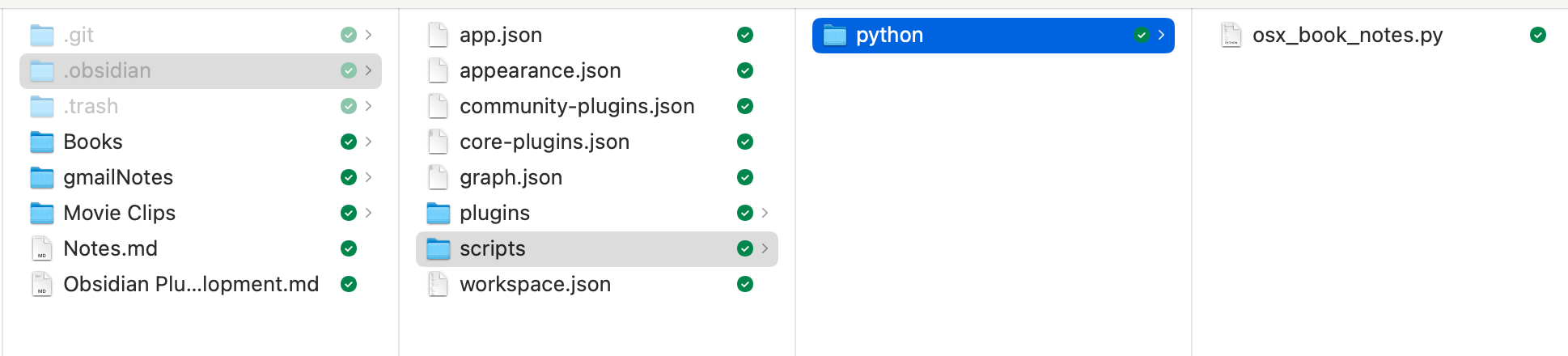
The .obsidian folder is hidden in the Mac OS. Type Command + Shift + . (period) to show it. If the scripts or python folders do not exist, create them.
Configuring the Obsidian Python Scripter Plugin
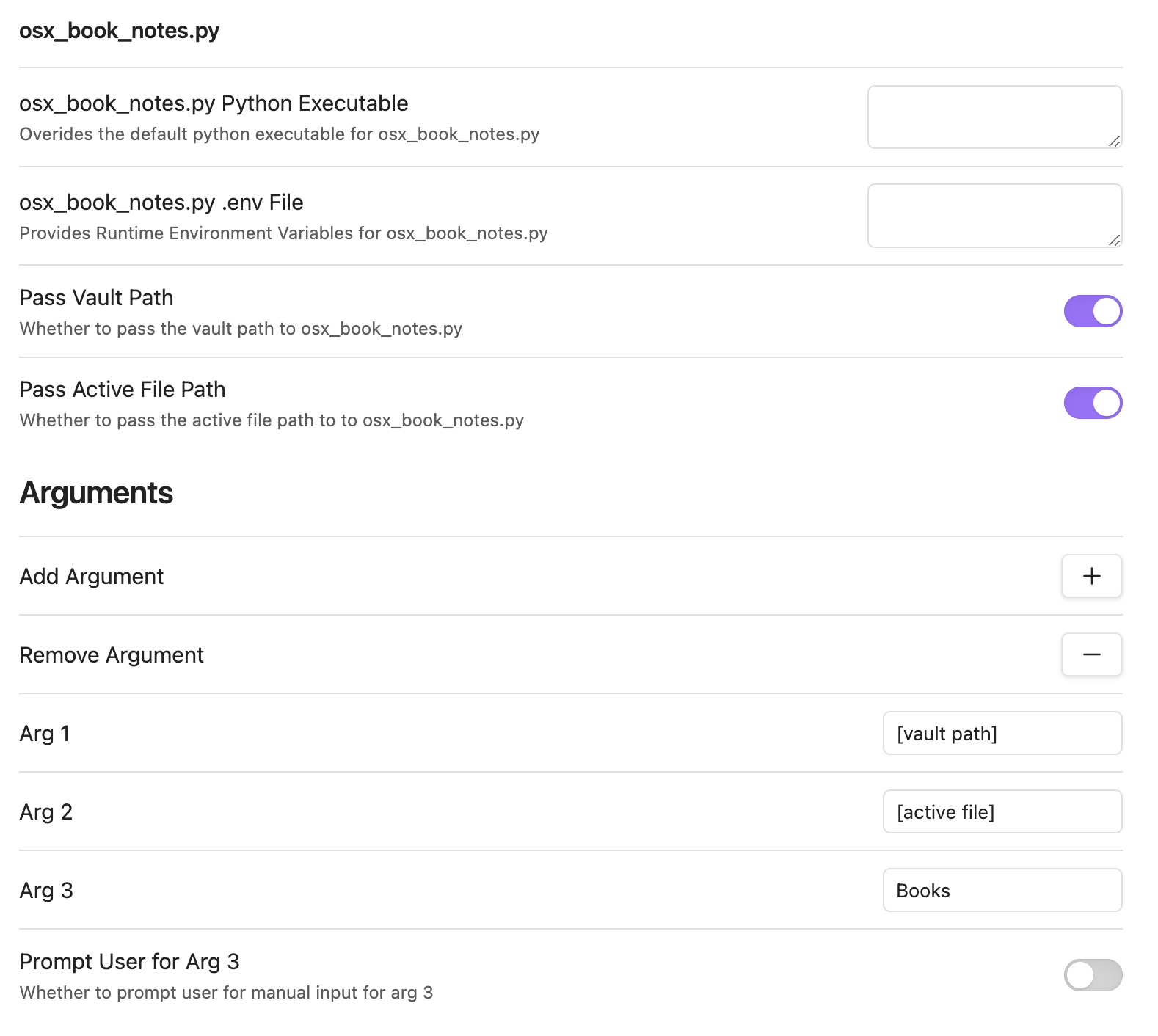
Enable the Python Scripter plugin. Once you do, go to its configuration page and you should see an entry for osx_book_notes.py. You can leave everything that is set the same if you want your book highlights imported into the root directly of your vault. If you want to specify a directory, click on the Add Argument button, which will add the Arg 3 entry to the form. Enter the path to the folder you want your notes stored there. And that’s all.
Running the Highlight Import
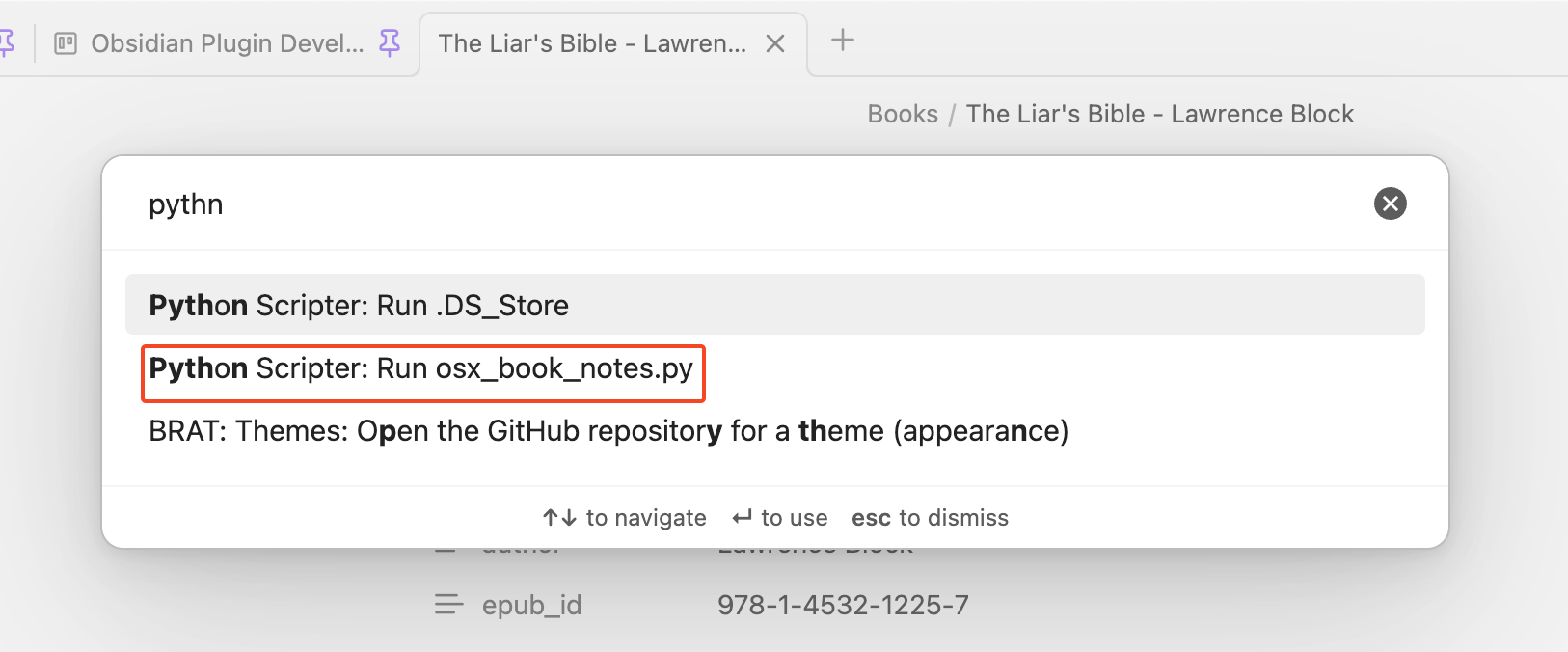
When you want to import highlights. Click Command + P to open the command palette, search for “python” and click on Python Scripter: Run osx_book_notes.py.
The Results
Here’s an example note:
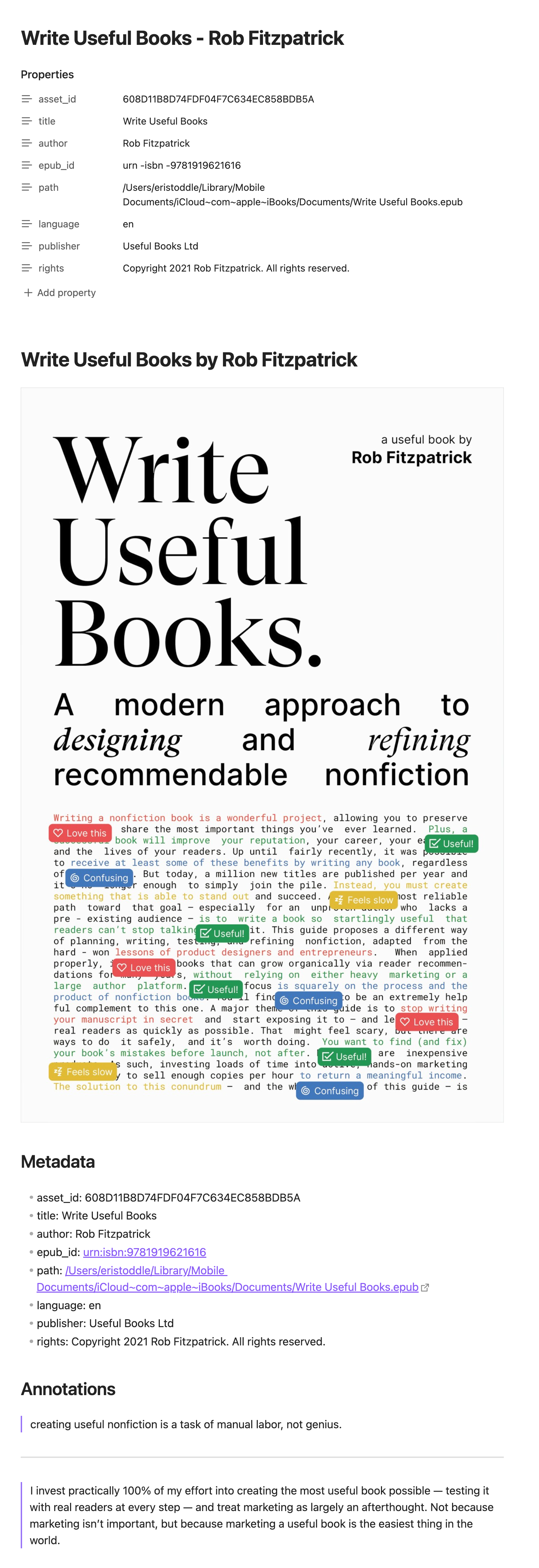
The Future: A Full-Fledged Obsidian Plugin to Import Book Highlights
I am actually just as familiar with JavaScript as I am with Python, but I am not as familiar with the Obsidian plugin API yet and I know how fiddly I can get with UI, features, and configuration. So I started with Python instead of figuring that and the ebook part out at the same time. With the Python script, I could prototype the interactions with the Books db and be sure everything would work. It actually worked better than expected, which surprised me. I pulled more data than Readwise did.
So one day I will turn this into an actual Obsidian plugin, now that I have the ebooks side of the equation figured out. Then it can have more features and options. There is not much you can do with this other than modify the Python script to do different things.
One issue with this Python implementation is that it imports all the highlights every time. This is great to keep everything in sync. Even with books you haven’t finished will be synced. The script just overwrites the old file. But the first time I ran it on my main Apple account, I realized how many accidential highlights I create. So I used my imported notes to find the books, removed the unwanted highlights in the Books app, deleted the notes, and ran the script again.
But when I create a plugin to do this, I can:
- Store a value from the SQLite database in metadata to determine when the book was last opened or highlighted and skip it (I have a dataview that sorts these by the modifed date and right now every one is modified every time in no specific order)
- Set default yaml entries for imported notes (for example, a
reviewedboolean or a#book/notestag ) - Configuration to set a template for a note so they can be customized
- Autosync on open
- Configuration option to provide a dialog to pick and choose which books to import
See what I meant about getting fiddly with features. Doing it this way first gave me an MVP in a few hours.
But really, Readwise make it relatively simple and you can try it out for two months for free to see if it works for you by signing up here.
* This website contains affiliate links. This means that if you click on a link and purchase a product or service, I may receive a small commission at no extra cost to you. Please note that I only recommend products and services that I believe in and that will add value to my readers. Not all links on this website are affiliate links. Learn more.
Related Posts

How I Built Two Obsidian Plugins While Kiro AI Did Most of the Work
Kiro helped me build two Obsidian plugins in 6-8 hours.
Creating an Obsidian Plugin with Claude AI
I wrote the original script in Python. I had Claude perfect it, then convert it to an Obsidian plugin.

Obsidian's New Web Clipper - You'll Want to Try It
Obsidian's official Web Clipper does even more than what I need it for it's made me change my workflow.